ResumeTemplates.com LOGO
  • Resume Templates
      TOP RESUME TEMPLATES
    • College
    • Combination
    • Stylish
    • Technology
    • Minimalist
    • Functional
    • Professional
    • Google Docs
    • Hybrid
    • ATS Friendly
    • Chronological
    • Microsoft Word
    • Traditional
    • Creative
    • Basic
    • General
    • Skills Based
    • Modern
    • Use our free resume templates tool
      Examples of resumes in our free resume builder tool

      When choosing a resume template, the priority should be a clean, professional look that can focus on your career accomplishments.

      Build My Resume
      View all 100+ Resume Templates
  • Resume Builder App
  • Resume Examples
      TOP RESUME EXAMPLES
    • Software Engineer
    • Registered Nurse
    • Sales
    • Customer Service Representative
    • Software Developer
    • Accountant
    • Coaching Resume
    • Product Manager
    • Teacher
    • Medical Assistant
    • Information Technology
    • Project Manager
    • Administrative Assistant
    • Bartender
    • Use our free resume templates tool
      Examples of resumes in our free resume builder tool

      When choosing a resume template, the priority should be a clean, professional look that can focus on your career accomplishments.

      Build My Resume
      View all 100+ Resume Examples
  • Resources
      Top Resources
    • Adding Your Writing Skills on a Resume
    • Bartender Job Description for a Resume
    • Best Resume File Formats
    • Effective Communication Skills for Resume With Examples, Tips, and Guide
    • Functional vs. Chronological Resume
    • Google Docs Resume Templates
    • Hobbies and Interests for Resumes
    • How Far Back Should a Resume Go?
    • How Much Does a Resume Builder Cost?
    • How To Demonstrate Organizational Skills
    • How To Edit a Resume Template in Word
    • How To Include Salary Requirements in Resumes
    • How To Insert a Picture in a Google Doc Resume Template
    • How to List Projects on a Resume
    • How To List Your Education on a Resume
    • How To Make a Resume
    • How To Make a Resume With No Job Experience
    • How to Make Your Resume Stand Out and Land Your Dream Job
    • How To Nail an Impressive Beginner Resume Summary
    • How To Present Your Accomplishments on a Resume
    • How To Say You’re a Quick Learner on Your Resume
    • How To Say You’re a Subject Matter Expert on a Resume
    • How To Upload Your Resume to Indeed
    • How To Write a Business Resume
    • How To Write a Cover Letter for a Resume
    • How To Write an Impressive Resume With Only One Job
    • How To Write a Resume Summary
    • How To Write a Student Resume
    • How To Write an Address on One Line
    • Key Skills Examples for Your Resume
    • Listing Udemy Certificates on a Resume
    • Make a Resume in Microsoft Word
    • Putting Coursera Certificates on a Resume
    • Resume Buzzwords and Cliches To Avoid
    • Resume Header Examples
    • Resume Icons, Logos, and Symbols
    • Resume Introduction And Intro Paragraph Examples
    • Resume Objective Examples
    • Resume Punctuation
    • Resume Vs. Curriculum Vitae
    • Should I Put My GPA on My Resume And How To List It
    • Summary of Qualifications for a Resume
    • The Best Color for Your Resume
    • The Complete Guide To Listing a U.S. Military Address on Your Resume
    • Types of Resume Templates
    • What Resume Template Do Employers Prefer?
    • What Template Should I Use for a Federal Resume?
    • What To Put on a Resume
    • Where To Find Free Resume Templates
    • Where To Post Your Resume for Remote Work
    • Write a Resume With No Experience
    • See all Resources
  • Research
      RESEARCH
    • 4-Day Work Week Survey
    • AI Hiring Survey
    • AI Lay Off Survey
    • AI Manager Survey
    • ChatGPT and Skill Assessments
    • ChatGPT Competence Survey
    • ChatGPT Contributes to Raises
    • Companies Increase In-Office Days
    • Companies Offer Lower Salaries YoY
    • Companies Reduce Salaries and Benefits
    • Companies Replace Workers With AI
    • DEI Survey
    • Employee Coffee-Badging
    • Employee Layoffs
    • Gen Z Interview Survey
    • Gen Z Worker Parents Survey
    • Hard and Soft Skills Hiring Survey
    • Hiring Managers Favor AI Skills
    • Hiring Managers Pass on Bad Resumes
    • Hiring Report
    • Listing Pronouns on Resumes
    • Lying on Resumes
    • Manager Gen Z Survey
    • Rehiring Workers Survey
    • See All Research Reports
  • Resources
      Top Resources
    • How To Fill Out A Resume Template
    • Guides and AdviceRESEARCH
    • Adding Your Writing Skills on a Resume
    • Bartender Job Description for a Resume
    • Best Resume File Formats
    • Effective Communication Skills for Resume With Examples, Tips, and Guide
    • Functional vs. Chronological Resume
    • Google Docs Resume Templates
    • Hobbies and Interests for Resumes
    • How Far Back Should a Resume Go?
    • How Much Does a Resume Builder Cost?
    • How To Demonstrate Organizational Skills
    • How To Edit a Resume Template in Word
    • How To Include Salary Requirements in Resumes
    • How To Insert a Picture in a Google Doc Resume Template
    • How to List Projects on a Resume
    • How To List Your Education on a Resume
    • How To Make a Resume
    • How To Make a Resume With No Job Experience
    • How to Make Your Resume Stand Out and Land Your Dream Job
    • How To Nail an Impressive Beginner Resume Summary
    • How To Present Your Accomplishments on a Resume
    • How To Say You’re a Quick Learner on Your Resume
    • How To Say You’re a Subject Matter Expert on a Resume
    • How To Upload Your Resume to Indeed
    • How To Write a Business Resume
    • How To Write a Cover Letter for a Resume
    • How To Write an Impressive Resume With Only One Job
    • How To Write a Resume Summary
    • How To Write a Student Resume
    • How To Write an Address on One Line
    • Key Skills Examples for Your Resume
    • Listing Udemy Certificates on a Resume
    • Make a Resume in Microsoft Word
    • Putting Coursera Certificates on a Resume
    • Resume Buzzwords and Cliches To Avoid
    • Resume Header Examples
    • Resume Icons, Logos, and Symbols
    • Resume Introduction And Intro Paragraph Examples
    • Resume Objective Examples
    • Resume Punctuation
    • Resume Vs. Curriculum Vitae
    • Should I Put My GPA on My Resume And How To List It
    • Summary of Qualifications for a Resume
    • The Best Color for Your Resume
    • The Complete Guide To Listing a U.S. Military Address on Your Resume
    • Types of Resume Templates
    • What Resume Template Do Employers Prefer?
    • What Template Should I Use for a Federal Resume?
    • What To Put on a Resume
    • Where To Find Free Resume Templates
    • Where To Post Your Resume for Remote Work
    • Write a Resume With No Experience
    • Research
    • 4-Day Work Week Survey
    • AI Hiring Survey
    • AI Lay Off Survey
    • AI Manager Survey
    • ChatGPT and Skill Assessments
    • ChatGPT Competence Survey
    • ChatGPT Contributes to Raises
    • Companies Increase In-Office Days
    • Companies Offer Lower Salaries YoY
    • Companies Reduce Salaries and Benefits
    • Companies Replace Workers With AI
    • DEI Survey
    • Employee Coffee-Badging
    • Employee Layoffs
    • Gen Z Interview Survey
    • Gen Z Worker Parents Survey
    • Hard and Soft Skills Hiring Survey
    • Hiring Managers Favor AI Skills
    • Hiring Managers Pass on Bad Resumes
    • Hiring Report
    • Listing Pronouns on Resumes
    • Lying on Resumes
    • Manager Gen Z Survey
    • Rehiring Workers Survey
    • Resources
    • See all Resources
  • My Account
  • Use our free resume templates tool
    Examples of resumes in our free resume builder tool

    When choosing a resume template, the priority should be a clean, professional look that can focus on your career accomplishments.

Build My Resume
Build My Resume
Home / Resume Examples / 2 Best Entry Level Information Technology Resume Examples and Templates for 2026

2 Best Entry Level Information Technology Resume Examples and Templates for 2026

Andrew Stoner
By Andrew Stoner
Andrew Stoner
Executive Resume Writer and Career Coach linkedin
Andrew Stoner
, Executive Resume Writer and Career Coach
Last Updated: October 9, 2026

Every resume example is written and reviewed by our team of Certified Professional Resume Writers to ensure top-quality content and formatting.

Entry level IT hiring now leans on proof of hands-on lab work, not just a degree. Home labs, help desk tickets, and cloud sandboxes carry more weight than coursework alone.

Show the tools you have touched: Windows Server, Active Directory, ServiceNow, and basic scripting in PowerShell or Python. IT managers and technical recruiters filter on specific keywords, so mirror the exact tool and certification names from the job posting.

The examples below show how to frame internships, help desk shifts, and personal projects as job-ready work. Use them to shape your own resume with concrete tools, tickets closed, and small automation wins.

Featured Example

Build your Entry Level Information Technology resume

Customize this template in our builder in under 10 minutes.

Build my resume
Excellent Excellent
4.7 STARS on 4.7 STAR
flash image Get the 2x more job offers*
On this page
On this page
  • Entry Level Information Technology Resume Examples
    • Featured Example
    • Entry Level Example
    • Text Version Entry Level Information Technology
  • How to Write an Entry Level Information Technology Resume
  • Most Popular Skills on Entry Level Information Technology Resumes for 2026
  • Must Have on an Entry Level Information Technology Resume
  • Latest BLS Statistics for Entry-level IT Professionals
  • Frequently Asked Questions
linkedin
twitter
facebook

Entry Level Information Technology Resume Examples

Featured Example

Featured Example
PDF
DOCX
Use This Template

Why this resume works

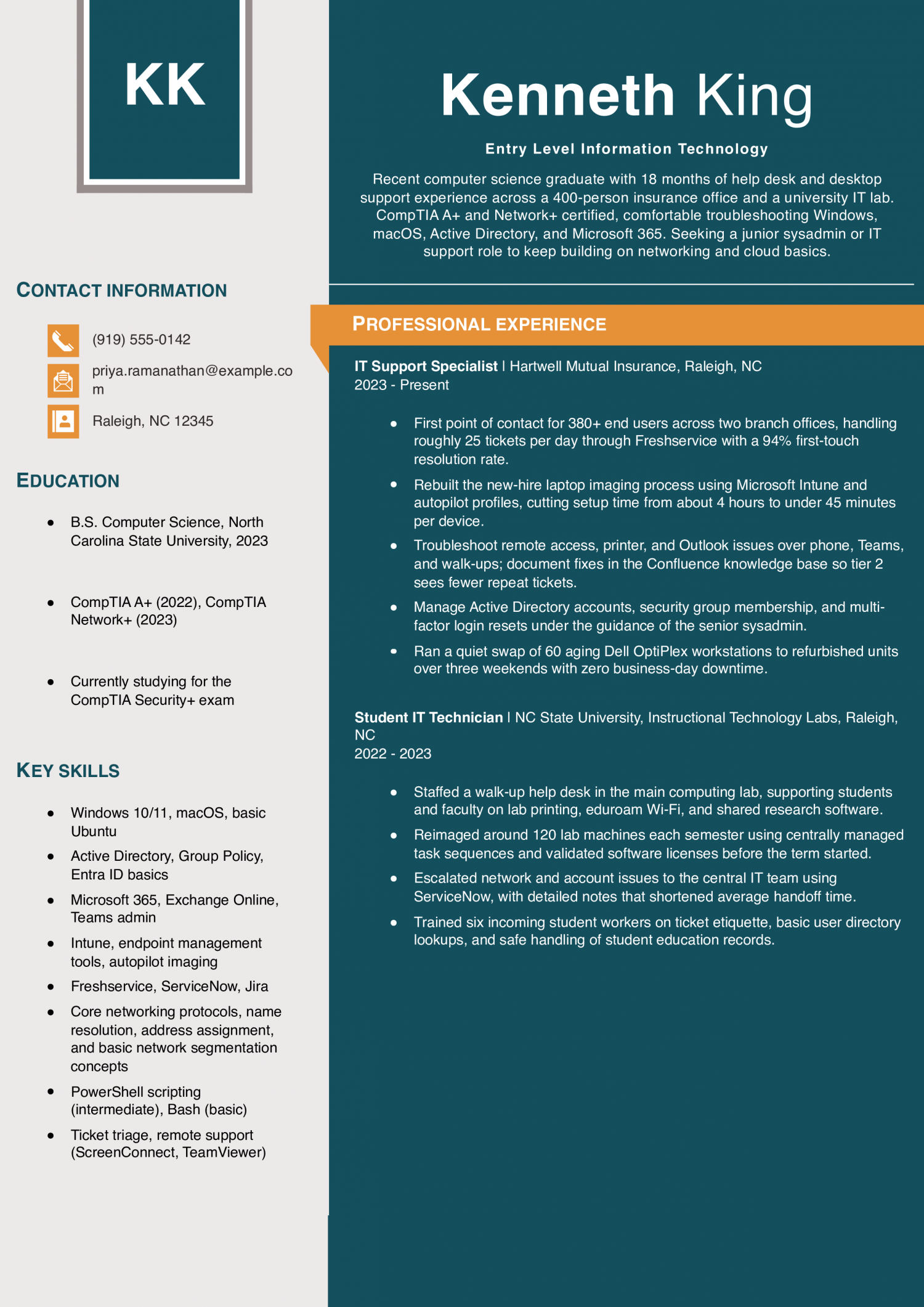
  • Real ticket numbers, not vague claims: Naming 380 users, 25 tickets per day, and a 94% first-touch rate gives a hiring manager something concrete to compare against their own help desk load.
  • Shows a real project, not just tickets: The Intune imaging rebuild and the 60-workstation weekend swap prove she can own a small project end to end, which is what separates a strong junior from a pure ticket-taker.
  • Certifications match the work: A+ and Network+ are the standard entry-level IT credentials, and studying for Security+ signals she is aiming beyond help desk without overclaiming.

Entry Level Example

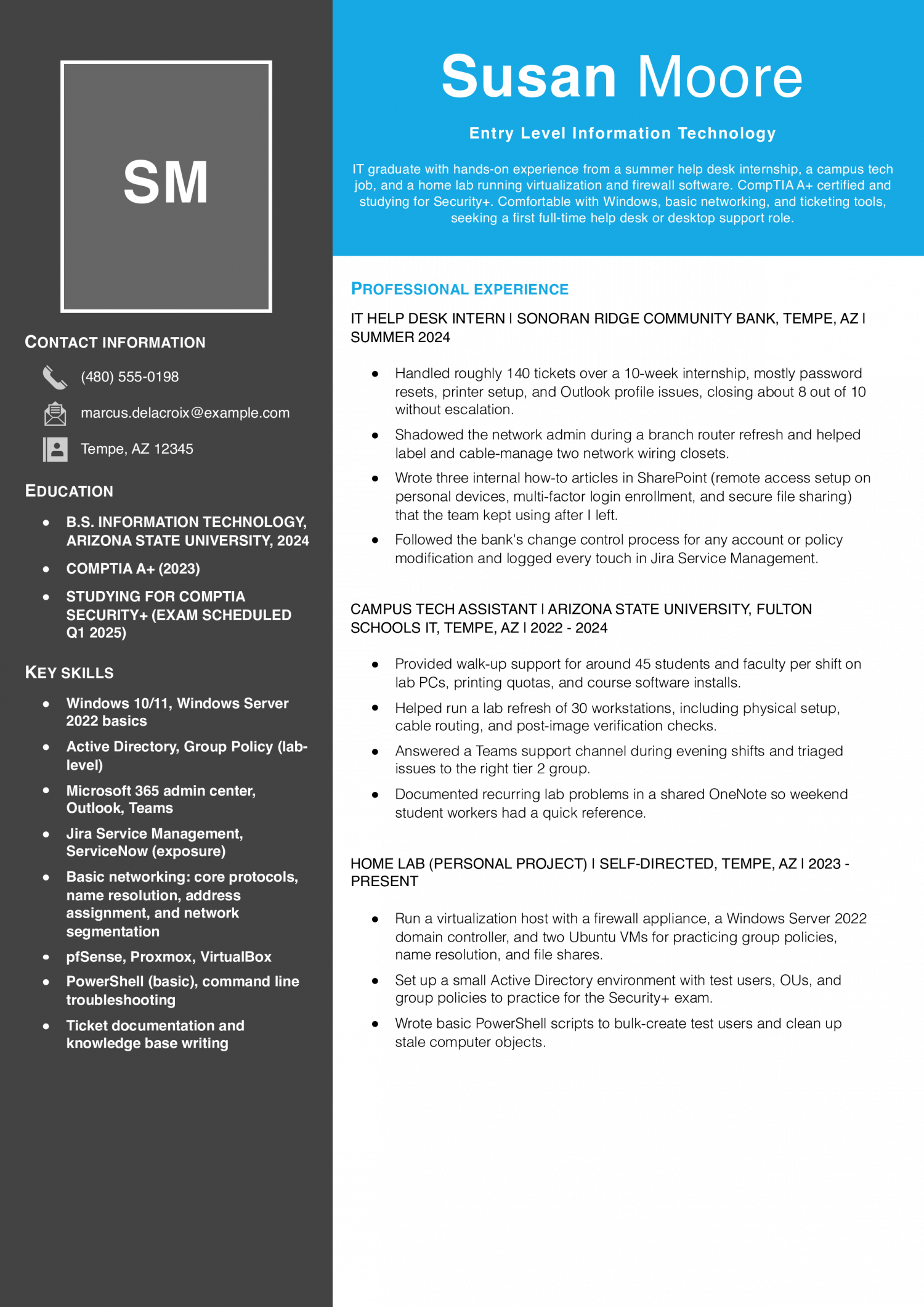
This resume fits someone with a two-year degree, a help desk internship, or a first support role. Show that you can troubleshoot tickets, image machines, and follow escalation paths IT managers and technical recruiters trust.

Entry Level Example
PDF
DOCX
Use This Template

Why this resume works

  • Home lab substitutes for thin work history: Running Proxmox, pfSense, and a small AD domain at home tells a hiring manager he is learning outside class, which matters a lot when work history is thin.
  • Calibrated language avoids overselling: Phrases like ‘lab-level’ Group Policy and ‘exposure’ to ServiceNow keep the resume trustworthy instead of overselling a summer intern.
  • Internship results in plain numbers: 140 tickets, 10 weeks, 8 out of 10 closed without escalation gives a recruiter a clear sense of the actual output during the internship.

Text Version Entry Level Information Technology

Elena Kowalski
Columbus, OH | (614) 555-0173 | [email protected] | linkedin.com/in/elena-kowalski

PROFESSIONAL SUMMARY

Entry-level IT support technician with two years of combined internship, help desk, and retail tech experience. CompTIA A+ and Network+ certified, comfortable with Windows, macOS, Microsoft 365, and basic networking. Known on past teams for clear ticket notes and patience with non-technical users. Looking for a full-time help desk or desktop support role with a path toward systems or network administration.

EXPERIENCE

Help Desk Technician (Contract)
Buckeye Regional Health Partners | Columbus, OH | 2024-Present

  • Support around 220 clinical and admin users across three outpatient clinics, averaging 22 tickets per day in Cherwell with a first-touch resolution rate near 88%.
  • Handle password resets, Epic Hyperspace launch issues, badge printer jams, and basic EMR client troubleshooting during morning huddle rush.
  • Coordinate with the field tech on hardware swaps and keep the shared asset spreadsheet current for the three clinic sites.
  • Follow patient-privacy handling procedures when supporting devices that touch clinical data, including proper wipe steps before returning hardware to the vendor.
  • Wrote a short internal guide on rejoining domain-joined laptops after long remote periods, which cut a recurring category of tickets noticeably.

IT Support Intern
Midwest Grain Cooperative | Columbus, OH | Summer 2023

  • Rotated through help desk, desktop, and light network shadowing during a 12-week internship.
  • Reimaged roughly 40 laptops for the fall harvest season using a network-based deployment task sequence documented by the senior tech.
  • Sat in on weekly change advisory board meetings and took notes for the IT manager.
  • Built a small script in PowerShell to check disk space and last reboot time across the office fleet, based on a template from the sysadmin.

Student IT Ambassador
Ohio State University, Office of Technology and Digital Innovation | Columbus, OH | 2022-2024

  • Staffed the student tech help desk in the main library, supporting eduroam Wi-Fi, printing quotas, and BuckeyeMail issues.
  • Handled about 30 walk-ins per shift during peak weeks and logged all interactions in ServiceNow.
  • Helped run a device donation event that refurbished around 55 laptops for local high school students.
  • Trained two new student workers on ticket documentation and account lookup basics.

Sales Associate, Tech Section
MicroCenter | Columbus, OH | 2021-2022

  • Advised customers on PC parts, networking gear, and peripherals; built about 15 custom PCs on the service bench.
  • Ran basic diagnostics on customer laptops (memory, drive health, thermal issues) and wrote up service tickets for the repair team.
  • Learned to explain technical tradeoffs to non-technical customers, which carries over to help desk work today.

EDUCATION

  • A.A.S. Network Systems Administration, Columbus State Community College, 2023
  • CompTIA A+ (2022)
  • CompTIA Network+ (2023)
  • Studying for Microsoft MS-900 Microsoft 365 Fundamentals

SKILLS

  • Windows 10/11, macOS support
  • Active Directory and Entra ID basics
  • Microsoft 365 (Exchange Online, Teams, SharePoint)
  • Ticketing: Cherwell, ServiceNow, Jira Service Management
  • Imaging: network deployment services, basic Intune exposure
  • Networking fundamentals: core protocols, name resolution, address assignment, Wi-Fi troubleshooting
  • PowerShell scripting (basic to intermediate)
  • Remote support tools: Bomgar, ScreenConnect
  • Hardware repair and PC building
  • Clear ticket documentation and end-user communication
Use this in our builder
Copied

How to Write an Entry Level Information Technology Resume

01 Open with a metric an IT manager reads first

The first line of your summary should name a number, not a claim of passion. Lead with tickets closed per week, systems supported, or users covered during an internship or help desk shift. IT managers and technical recruiters scan the summary to gauge your throughput and comfort with volume.

A line like “resolved 40 plus tier one tickets weekly across 300 users” reads as ready to work. If you lack paid history, cite lab hours, home lab builds, or CompTIA practice environments with the same numeric shape. Follow the metric with the stack you used, such as Windows 10 or Office 365.

Keep the whole summary to three lines so the number stays visible.

02 Turn tasks into numbers recruiters can scan

A bullet with no number in it reads as a task list, not a track record. For entry level IT, strong bullets show ticket volume, first-call resolution rate, average handle time, or user counts supported. Name two or three realistic metrics per role, such as “closed 25 tickets daily at 92 percent first-call resolution.” If you have no ticketing data, pivot to scope: number of endpoints imaged, accounts provisioned, or classrooms wired.

Recruiters scan for these figures before reading the verb. Pair each metric with the tool that produced it, such as ServiceNow, Jira, or Intune. Avoid inflating numbers you cannot defend in an interview.

A modest, verifiable figure beats a round number that collapses under a follow-up question about your environment.

03 Group your work into clear technical categories

Sort your bullets so a reviewer can find each skill area in one glance. Most entry level IT resumes cluster well into four buckets. Use end user support for password resets, imaging, and hardware swaps.

Use networking for cable runs, switch port work, and basic Wi-Fi troubleshooting. Use identity and access for directory and Group Policy tasks. Use documentation for knowledge base articles and runbooks you drafted.

Under each cluster, list two or three bullets with a verb, a scope, and a result. This structure helps IT managers and technical recruiters match you to a queue they already staff. It also keeps you from repeating the same generic “provided technical support” line five times.

04 Place credentials and tools near the top

Put a short credentials block on page one, directly under your summary. List certifications like CompTIA A plus, Network plus, Security plus, or Microsoft and Cisco associate credentials if you hold them. Note any in progress exam with a test date so recruiters see momentum.

Add a technical skills band beneath it grouped by category: operating systems, ticketing, directory services, networking, and scripting. IT managers and technical recruiters filter resumes on these keywords before reading prose. Buried tool names get missed by both humans and applicant tracking systems.

Keep the list to concrete products you have actually touched, such as ServiceNow, Jira, or PowerShell. Skip broad claims like “proficient in all Microsoft products,” which read as filler. If help desk and support work is your target, see our technical support resume examples for ways to present your credentials and tools.

05 Close with education, labs, and projects

End the resume with an education section that carries weight for an early career candidate. List your degree or program, school, and graduation date or expected date. Add relevant coursework in networking, operating systems, or cybersecurity if your work history is thin.

Below education, include a home lab or projects block, since IT managers and technical recruiters read this as self-directed practice. Name what you built, such as a Windows Server domain with three virtual machines, a pfSense firewall, or a Raspberry Pi Pi-hole. Note the tools and outcome in one line each.

Two or three projects tend to advance further than a long list of half-finished ones. Close with any part-time roles that show reliability, even outside IT.

Most Popular Skills on Entry Level Information Technology Resumes for 2026

Entry level IT hiring is tight in 2026. Help desk teams are running leaner and the bar to clear a screen is higher. Check both tables against the actual posting before you finalize your skills section.

IT managers and technical recruiters read the hard skills first to confirm you can work a ticket queue. They check soft skills like communication next, to see if you can walk a user through a fix. Both lists carry weight, but the hard skills pass the scan.

Pull the terms that appear in your target posting. Map each one to a bullet in your work history that proves you used it. Do not pad the list with tools you touched once in a lab.

Keep the phrasing exact: write Active Directory the way the posting writes it. Read the job ad twice before you edit. Cut any skill you cannot back up in an interview.

That gap is easy to spot in a phone screen.

Soft Skills AI-estimated %
Clear technical communication 72%
Patient user guidance 55%
Calm under pressure 40%
Team collaboration 39%
Adaptability to change 34%

And here are the top hard skills showing up most often.

Hard Skills AI-estimated %
Help desk troubleshooting 75%
Hardware installation support 54%
Software configuration 42%
User account management 35%
Incident ticket documentation 29%

Skill names and rankings come from an AI model grounded in U.S. Department of Labor occupation data for entry-level IT professionals, not from a count of entry-level IT professionals’ resumes built on ResumeTemplates.com.

Must Have on an Entry Level Information Technology Resume

Before an entry level information technology resume gets a closer read, hiring teams check for a short list of essentials.

Niche Keywords for ATS Checkers

IT managers and technical recruiters scan for the tools you have actually touched. They also want proof you know the support work of the job. Sort your keywords by the kind of support work each one proves. Help desk terms show you can take tickets and close them. End user support terms show you can walk people through fixes. Network basics show you understand how office traffic moves. Hardware terms show you can swap parts and image machines. Cloud and identity terms show you can manage accounts and access. Pick the groups that match your training or your first role. Then write each term the way the trade writes it, with the right capitals. That is what an ATS filter is built to catch.

Niche Keywords ATS scans for
Help desk support Tier 1 support, ServiceNow tickets, SLA response
End user support Windows 11 imaging, Active Directory, password resets
Network basics network cabling, wireless setup, switch configuration
Hardware and asset PC deployment, memory upgrades, asset tagging
Cloud and identity Microsoft 365, Azure, account provisioning

AI Skills to Add

AI use on an entry level IT resume can go three ways. You can lead with a title like ‘AI-powered support specialist,’ which technical recruiters screen out fast. You can leave it off and field the question during a phone screen. Or you can describe the workflow as it actually runs on a help desk. Name the ticket you triaged, the tool you prompted, and the senior tech who checked the fix before it shipped. The third path is what IT managers and technical recruiters can validate against a reference call.

What AI is actually changing for this role
Ticket triage

Copilots suggest a category and priority, and you confirm the routing before the ticket reaches a queue.

First-line troubleshooting

Chatbots draft a first reply from the knowledge base, and you edit it before sending to the end user.

Script drafting

You prompt a model for a PowerShell or Bash starter, then test it in a sandbox before running in production.

Documentation

AI drafts runbook updates from your ticket notes, and a senior tech signs off before the article goes live.

AI tools to name

  • Microsoft Copilot: Draft ticket summaries and PowerShell snippets, then verify against vendor documentation.
  • ChatGPT: Explain unfamiliar error codes and outline troubleshooting steps you then test in a lab.
How to phrase AI on your resume
Do
  • Name the tool, the task, and the reviewer
  • Show sandbox testing before production changes
Skip
  • AI-powered IT support ninja
  • Leveraging generative AI to revolutionize help desk

Latest BLS Statistics for Entry-level IT Professionals

About These Numbers

The Bureau of Labor Statistics does not publish a wage code for Entry Level Information Technology specifically. The numbers below are a proxy: the closest published match is Computer User Support Specialists (SOC 15-1232), so use them as an estimate for this role, not an exact figure.

The pay gap between the top and bottom of this tier is wide. The top earners make far more than the middle, and the bottom sits well below it. That spread is wider than you would expect for a starting tier.

It shows the market sorts fast on what you can prove you have touched, not on the fact that you hold a degree. National employment in the field is large, so the tables below will show real geographic range in what the same title pays. Build the resume around specific stacks, tickets closed, and any hands-on lab or internship work.

Lead with the tools IT managers and technical recruiters can match to their own environment on the first read.

$61,860 National median annual
$67,330 National mean annual
$40,980 10th percentile
$100,540 90th percentile
717,190 Entry-level IT Professionals in the U.S.
Where you stand

Below median

$40,980 to $61,860 Show your degree or bootcamp, home lab builds, and any help desk hours logged.

Above median

$61,860 to $100,540 List ticket volume closed, the ticketing system used, and one cloud or networking certification.

Top 10%

$100,540+ Feature production systems you supported, on-call hours, and scripting work in PowerShell or Python.

Top-paying states

# State Median Annual
1 District of Columbia $80,950
2 California $79,570
3 Washington $75,220
4 Massachusetts $75,070
5 New York $72,560
6 Colorado $71,900
7 Connecticut $70,210
8 Wyoming $65,100
9 Virginia $65,040
10 Maryland $64,750

Highest-employment states

# State Workers Median
1 California 74,490 $79,570
2 Texas 72,030 $59,490
3 Florida 51,220 $58,740
4 New York 39,100 $72,560
5 Pennsylvania 30,560 $58,670
-3.5% projected growthJob outlook, 2025-2035

Source: U.S. Bureau of Labor Statistics, Employment Projections, 2025-2035. View on bls.gov
Source: U.S. Bureau of Labor Statistics, OEWS May 2025 release (SOC 15-1232). View on bls.gov
Written by professional resume writers and loved by hiring managers

Resume Templates offers HR approved resume templates to help you create a professional resume in minutes. Choose from several template options and even pre-populate a resume from your profile.

Build My Resume

Frequently Asked Questions

How do you start an entry level information technology career?

Pick one track first, such as help desk support, network administration, or cloud operations.

Build two or three home lab projects that mirror the tasks in the job posting. Put those projects on your resume with the tools you used and what you fixed or built.

What entry level IT roles should you target with this resume?

Help desk technician, desktop support, and junior systems administrator are the common first roles.

Cloud support associate and junior security analyst also hire from the same resume with a small tools swap. Tailor the summary and skills list to the one posting you are sending it to.

What resume format works best for entry level IT candidates?

Use a reverse chronological format with a short summary, skills, projects, experience, and education.

IT managers and technical recruiters scan for tools and ticket counts, so keep sections labeled and predictable. Save the file as a PDF unless the posting asks for a Word document.

How do you show experience on an IT resume when you have no job history?

Treat home lab work, coursework, and internships as real experience with dates, tools, and measurable results.

Write bullets that name the problem you solved, the tools you used, and the outcome you produced. A lab where you set up Active Directory for 20 mock users belongs on the resume.

Should you list certifications you are still studying for?

Yes, list an in-progress certification with the exam name and your scheduled test date on one line.

IT managers and technical recruiters read that as active momentum rather than a finished credential. Move it to the completed list the week you pass the exam.

How long should an entry level IT resume be?

One page is the standard for entry level IT, and a technical recruiter will spend under a minute on it.

Trim older retail or food service jobs to a single line each so the tools and projects have room. Go to a second page only when you have relevant internships and lab work that will not fit.

How do you list a degree you have not finished yet?

Write the degree name, the school, and an expected graduation month and year on one line.

If you left school without finishing, list the coursework completed and the years attended without an expected date. Keep this section near the bottom once you have certifications or paid IT experience above it.

What's the best resume template for an entry-level IT professional?

For an entry-level IT professional, an ATS-friendly template is the safest pick, because it puts your certifications and experience where a hiring manager scans first. A basic template is a solid alternative. Whichever you choose, keep the formatting clean and easy to parse: clear section headings, a standard font, and no graphics a parser can choke on.

Rate this article

Entry Level Information Technology Resume

Average Rating

4.5/5 stars with 137 reviews

You have given 0 Star(s)
4.5/5 stars with 137 reviews

Check Out Related Examples

Featured Example
Help Desk Resume Examples and Templates for 2026

Andrew Stoner By: Andrew Stoner

Your profile should state your years on a service desk, the environment you support, and the ticketing system you live in. Name the user count, the operating systems, and whether you work tier 1, tier…
Featured Example - Entry Level Software Engineer
Entry-Level Software Engineer Resume Examples and Templates for 2026
Andrew Stoner By: Andrew Stoner

The first line of your summary should name a concrete artifact, not a self-description. Lead with a shipped project, a language stack, and any production users or pull requests merged. Engineering managers and senior engineers…

Featured Example
System Administrator Resume Examples and Templates for 2026
Andrew Stoner By: Andrew Stoner

The first line of your summary should name the user count or server count you supported, your uptime figure, and your on-call rotation. IT managers and infrastructure leads read that combination as readiness for their…

Featured Example
Cybersecurity Resume Examples and Templates for 2026
Andrew Stoner By: Andrew Stoner

Lead the summary with a number that sizes your detection work. Name your alert volume per shift, the MTTR you carry, or the percentage of false positives you cut. SOC managers and CISOs read that…

Featured Example
Desktop Support Resume Examples and Templates for 2026
Andrew Stoner By: Andrew Stoner

Lead with one line an IT manager cannot pull from a job title. Name the environment you actually supported: 400 Windows and Mac endpoints across three offices, a mixed thin client floor, or an Intune…

Featured Example
IT Specialist Resume Examples and Templates for 2026
Andrew Stoner By: Andrew Stoner

Your summary should lead with a number, not a job title recap. IT managers and support team leads scan the first line for ticket volume, uptime figures or endpoint counts. Name your average tickets closed…

Andrew Stoner
Andrew Stoner

Executive Resume Writer and Career Coach

Andrew Stoner is an executive career coach and resume writer with 17 years of experience as a hiring manager and operations leader at two Fortune 500 Financial Services companies, and as the career services director at two major university business schools.

Featured Example

Build your Entry Level Information Technology resume

Customize this template in our builder in under 10 minutes.

Build my resume
Excellent Excellent
4.7 STARS on 4.7 STAR
flash image Get the 2x more job offers*
ResumeTemplates.com LOGO
Trustpilot

Elevate your career with insider job advice and expert resume templates.

Build Your Resume
  • AI Resume Builder
  • Resume Builder App
  • Action Verbs, Power Words, and Strong Synonyms to Use on Your Resume
  • How Long Should a Resume Be?
  • How To Make a Resume
  • Key Skills Examples for Your Resume
Essential Resume Guides
  • Are Resume Templates a Good Idea?
  • How to List Work Experience on a Resume
  • How To Fill Out a Resume Template
  • How To Use a Resume Template for Free
About Resume Templates
  • About Us
  • Contact Us
  • Privacy Policy
  • Terms of Service
  • Do Not Sell or Share

© 2026 Resumetemplates.com All rights reserved.