ResumeTemplates.com LOGO
  • Resume Templates
      TOP RESUME TEMPLATES
    • College
    • Combination
    • Stylish
    • Technology
    • Minimalist
    • Functional
    • Professional
    • Google Docs
    • Hybrid
    • ATS Friendly
    • Chronological
    • Microsoft Word
    • Traditional
    • Creative
    • Basic
    • General
    • Skills Based
    • Modern
    • Use our free resume templates tool
      Examples of resumes in our free resume builder tool

      When choosing a resume template, the priority should be a clean, professional look that can focus on your career accomplishments.

      Build My Resume
      View all 100+ Resume Templates
  • Resume Builder App
  • Resume Examples
      TOP RESUME EXAMPLES
    • Software Engineer
    • Registered Nurse
    • Sales
    • Customer Service Representative
    • Software Developer
    • Accountant
    • Coaching Resume
    • Product Manager
    • Teacher
    • Medical Assistant
    • Information Technology
    • Project Manager
    • Administrative Assistant
    • Bartender
    • Use our free resume templates tool
      Examples of resumes in our free resume builder tool

      When choosing a resume template, the priority should be a clean, professional look that can focus on your career accomplishments.

      Build My Resume
      View all 100+ Resume Examples
  • Resources
      Top Resources
    • Adding Your Writing Skills on a Resume
    • Bartender Job Description for a Resume
    • Best Resume File Formats
    • Effective Communication Skills for Resume With Examples, Tips, and Guide
    • Functional vs. Chronological Resume
    • Google Docs Resume Templates
    • Hobbies and Interests for Resumes
    • How Far Back Should a Resume Go?
    • How Much Does a Resume Builder Cost?
    • How To Demonstrate Organizational Skills
    • How To Edit a Resume Template in Word
    • How To Include Salary Requirements in Resumes
    • How To Insert a Picture in a Google Doc Resume Template
    • How to List Projects on a Resume
    • How To List Your Education on a Resume
    • How To Make a Resume
    • How To Make a Resume With No Job Experience
    • How to Make Your Resume Stand Out and Land Your Dream Job
    • How To Nail an Impressive Beginner Resume Summary
    • How To Present Your Accomplishments on a Resume
    • How To Say You’re a Quick Learner on Your Resume
    • How To Say You’re a Subject Matter Expert on a Resume
    • How To Upload Your Resume to Indeed
    • How To Write a Business Resume
    • How To Write a Cover Letter for a Resume
    • How To Write an Impressive Resume With Only One Job
    • How To Write a Resume Summary
    • How To Write a Student Resume
    • How To Write an Address on One Line
    • Key Skills Examples for Your Resume
    • Listing Udemy Certificates on a Resume
    • Make a Resume in Microsoft Word
    • Putting Coursera Certificates on a Resume
    • Resume Buzzwords and Cliches To Avoid
    • Resume Header Examples
    • Resume Icons, Logos, and Symbols
    • Resume Introduction And Intro Paragraph Examples
    • Resume Objective Examples
    • Resume Punctuation
    • Resume Vs. Curriculum Vitae
    • Should I Put My GPA on My Resume And How To List It
    • Summary of Qualifications for a Resume
    • The Best Color for Your Resume
    • The Complete Guide To Listing a U.S. Military Address on Your Resume
    • Types of Resume Templates
    • What Resume Template Do Employers Prefer?
    • What Template Should I Use for a Federal Resume?
    • What To Put on a Resume
    • Where To Find Free Resume Templates
    • Where To Post Your Resume for Remote Work
    • Write a Resume With No Experience
    • See all Resources
  • Research
      RESEARCH
    • 4-Day Work Week Survey
    • AI Hiring Survey
    • AI Lay Off Survey
    • AI Manager Survey
    • ChatGPT and Skill Assessments
    • ChatGPT Competence Survey
    • ChatGPT Contributes to Raises
    • Companies Increase In-Office Days
    • Companies Offer Lower Salaries YoY
    • Companies Reduce Salaries and Benefits
    • Companies Replace Workers With AI
    • Cost-of-Living Survey
    • DEI Survey
    • Employee Coffee-Badging
    • Employee Layoffs
    • Gen Z Interview Survey
    • Gen Z Worker Parents Survey
    • Hard and Soft Skills Hiring Survey
    • Hiring Managers Favor AI Skills
    • Hiring Managers Pass on Bad Resumes
    • Hiring Report
    • Listing Pronouns on Resumes
    • Lying on Resumes
    • Manager Gen Z Survey
    • Rehiring Workers Survey
    • See All Research Reports
  • Resources
      Top Resources
    • How To Fill Out A Resume Template
    • Guides and AdviceRESEARCH
    • Adding Your Writing Skills on a Resume
    • Bartender Job Description for a Resume
    • Best Resume File Formats
    • Effective Communication Skills for Resume With Examples, Tips, and Guide
    • Functional vs. Chronological Resume
    • Google Docs Resume Templates
    • Hobbies and Interests for Resumes
    • How Far Back Should a Resume Go?
    • How Much Does a Resume Builder Cost?
    • How To Demonstrate Organizational Skills
    • How To Edit a Resume Template in Word
    • How To Include Salary Requirements in Resumes
    • How To Insert a Picture in a Google Doc Resume Template
    • How to List Projects on a Resume
    • How To List Your Education on a Resume
    • How To Make a Resume
    • How To Make a Resume With No Job Experience
    • How to Make Your Resume Stand Out and Land Your Dream Job
    • How To Nail an Impressive Beginner Resume Summary
    • How To Present Your Accomplishments on a Resume
    • How To Say You’re a Quick Learner on Your Resume
    • How To Say You’re a Subject Matter Expert on a Resume
    • How To Upload Your Resume to Indeed
    • How To Write a Business Resume
    • How To Write a Cover Letter for a Resume
    • How To Write an Impressive Resume With Only One Job
    • How To Write a Resume Summary
    • How To Write a Student Resume
    • How To Write an Address on One Line
    • Key Skills Examples for Your Resume
    • Listing Udemy Certificates on a Resume
    • Make a Resume in Microsoft Word
    • Putting Coursera Certificates on a Resume
    • Resume Buzzwords and Cliches To Avoid
    • Resume Header Examples
    • Resume Icons, Logos, and Symbols
    • Resume Introduction And Intro Paragraph Examples
    • Resume Objective Examples
    • Resume Punctuation
    • Resume Vs. Curriculum Vitae
    • Should I Put My GPA on My Resume And How To List It
    • Summary of Qualifications for a Resume
    • The Best Color for Your Resume
    • The Complete Guide To Listing a U.S. Military Address on Your Resume
    • Types of Resume Templates
    • What Resume Template Do Employers Prefer?
    • What Template Should I Use for a Federal Resume?
    • What To Put on a Resume
    • Where To Find Free Resume Templates
    • Where To Post Your Resume for Remote Work
    • Write a Resume With No Experience
    • Research
    • 4-Day Work Week Survey
    • AI Hiring Survey
    • AI Lay Off Survey
    • AI Manager Survey
    • ChatGPT and Skill Assessments
    • ChatGPT Competence Survey
    • ChatGPT Contributes to Raises
    • Companies Increase In-Office Days
    • Companies Offer Lower Salaries YoY
    • Companies Reduce Salaries and Benefits
    • Companies Replace Workers With AI
    • Cost-of-Living Survey
    • DEI Survey
    • Employee Coffee-Badging
    • Employee Layoffs
    • Gen Z Interview Survey
    • Gen Z Worker Parents Survey
    • Hard and Soft Skills Hiring Survey
    • Hiring Managers Favor AI Skills
    • Hiring Managers Pass on Bad Resumes
    • Hiring Report
    • Listing Pronouns on Resumes
    • Lying on Resumes
    • Manager Gen Z Survey
    • Rehiring Workers Survey
    • Resources
    • See all Resources
  • My Account
  • Use our free resume templates tool
    Examples of resumes in our free resume builder tool

    When choosing a resume template, the priority should be a clean, professional look that can focus on your career accomplishments.

Build My Resume
Build My Resume
Home / Resume Examples / 4 Best Information Technology Resume Examples and Templates for 2026

4 Best Information Technology Resume Examples and Templates for 2026

Andrew Stoner
By Andrew Stoner
Andrew Stoner
Executive Resume Writer and Career Coach linkedin
Andrew Stoner
, Executive Resume Writer and Career Coach
Last Updated: October 26, 2026

Every resume example is written and reviewed by our team of Certified Professional Resume Writers to ensure top-quality content and formatting.

Generative AI rewired information technology work in a year. Resumes still written for 2023 are quietly losing the queue to ones that show ChatGPT and Microsoft Copilot in the daily stack. The roles are still open across managed service providers, in-house IT departments, healthcare systems, and cloud-native startups; the pressure is on your resume to look current. What pulls an IT director back for a second read is hands-on proof: ticket volume cleared against SLA, uptime held, a migration or hardening project shipped.

For most openings, your resume passes an ATS keyword parse, then a recruiter scan, then a technical hiring manager. Name the real stack, Windows, Linux, Azure, AWS, ServiceNow, PowerShell, and the certs behind it, CompTIA, AWS, Cisco, ITIL.

We studied thousands of IT postings, tracked current hiring signals, and reviewed resumes that landed offers at strong employers. The examples below span help desk, systems administration, and cloud security, from entry level to senior, and help you prove you keep the business running.

Teenager Resume Example – Academic and STEM Interest
Get Started Now
Excellent Excellent
4.7 STARS on 4.7 STAR
flash image Get the 2x more job offers*
On this page
On this page
  • Featured Example
    • Entry Level Example
    • Mid Career Example
    • Senior Example
    • Text Version Information Technology
  • How to Write an Information Technology Resume
    • 01 Open with the metric an IT director would size you up by
    • 02 Quantify every bullet with a real number
    • 03 Group your work by IT discipline
    • 04 Place certifications and stack on page one
    • 05 Cut the lines that no longer earn space
  • Most Popular Skills on Information Technology Resumes for 2026
  • Must Have on an Information Technology Resume
    • Niche Keywords for ATS Checkers
    • AI Skills to Add
    • AI tools to name
  • Tech Stack to List on an IT Resume
  • Information Technology Credentials That Get You the Job
  • Frequently Asked Questions
linkedin
twitter
facebook
Tip !

The IT resumes that advance past the first technical screen share three things: a named stack block on page one, ticket or uptime metrics inside each bullet, and certifications dated within the last three years.

Andrew Stoner , Executive Resume Writer and Career Coach

Featured Example

Featured Example - Information Technology
PDF
DOCX
Use This Template
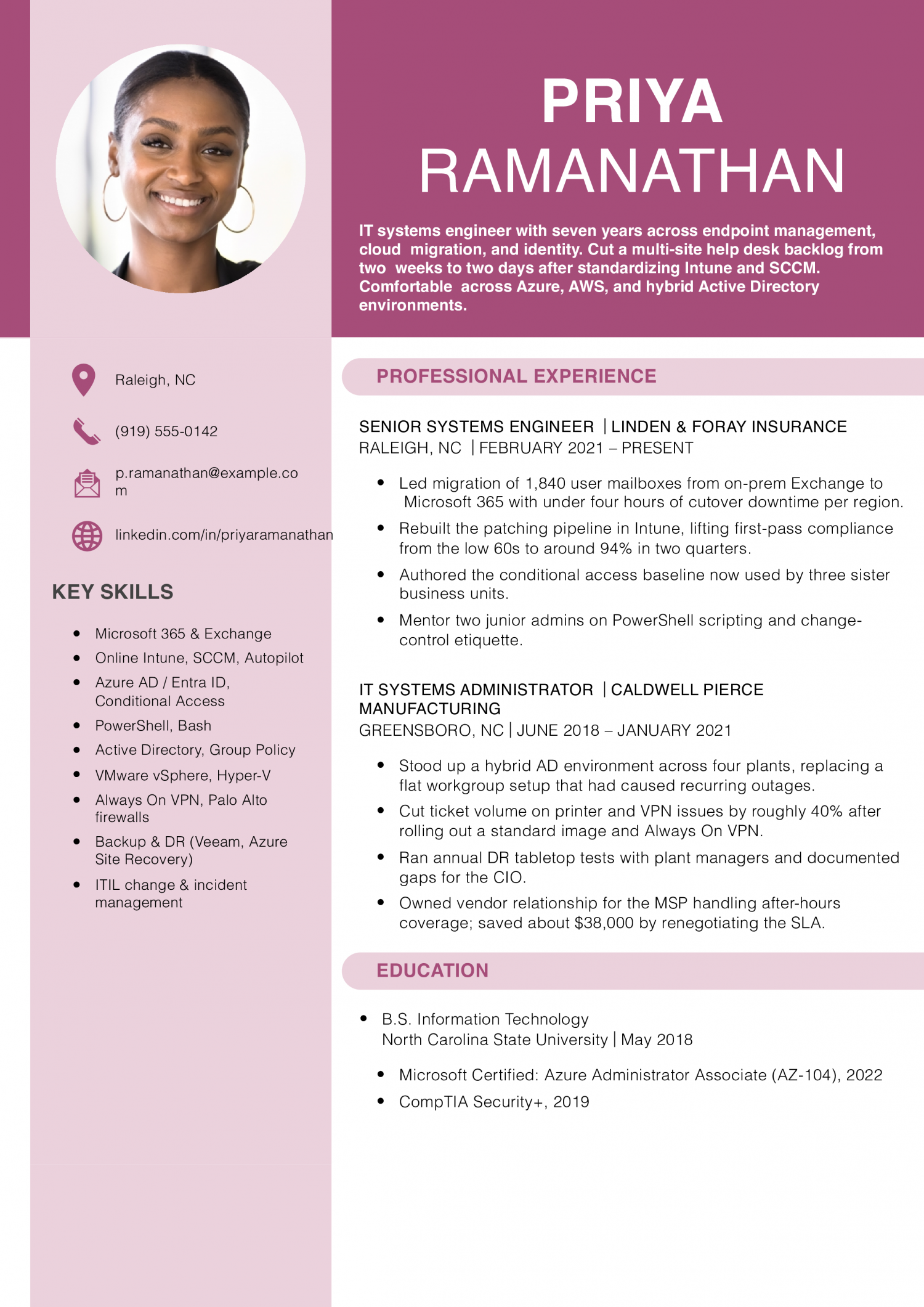
Why this resume works
  • Numbers tied to real outcomes: The mailbox migration count and patch compliance jump show scope and effect, not vague claims.
  • Shows growth between roles: The move from administrator to senior engineer is backed by bigger systems and mentoring duties.
  • Mix of cloud and on-prem skills: Hybrid AD, Intune, and Microsoft 365 work signal the blended environments most employers actually run.
Jump to a separate text resume example ↓

Entry Level Example

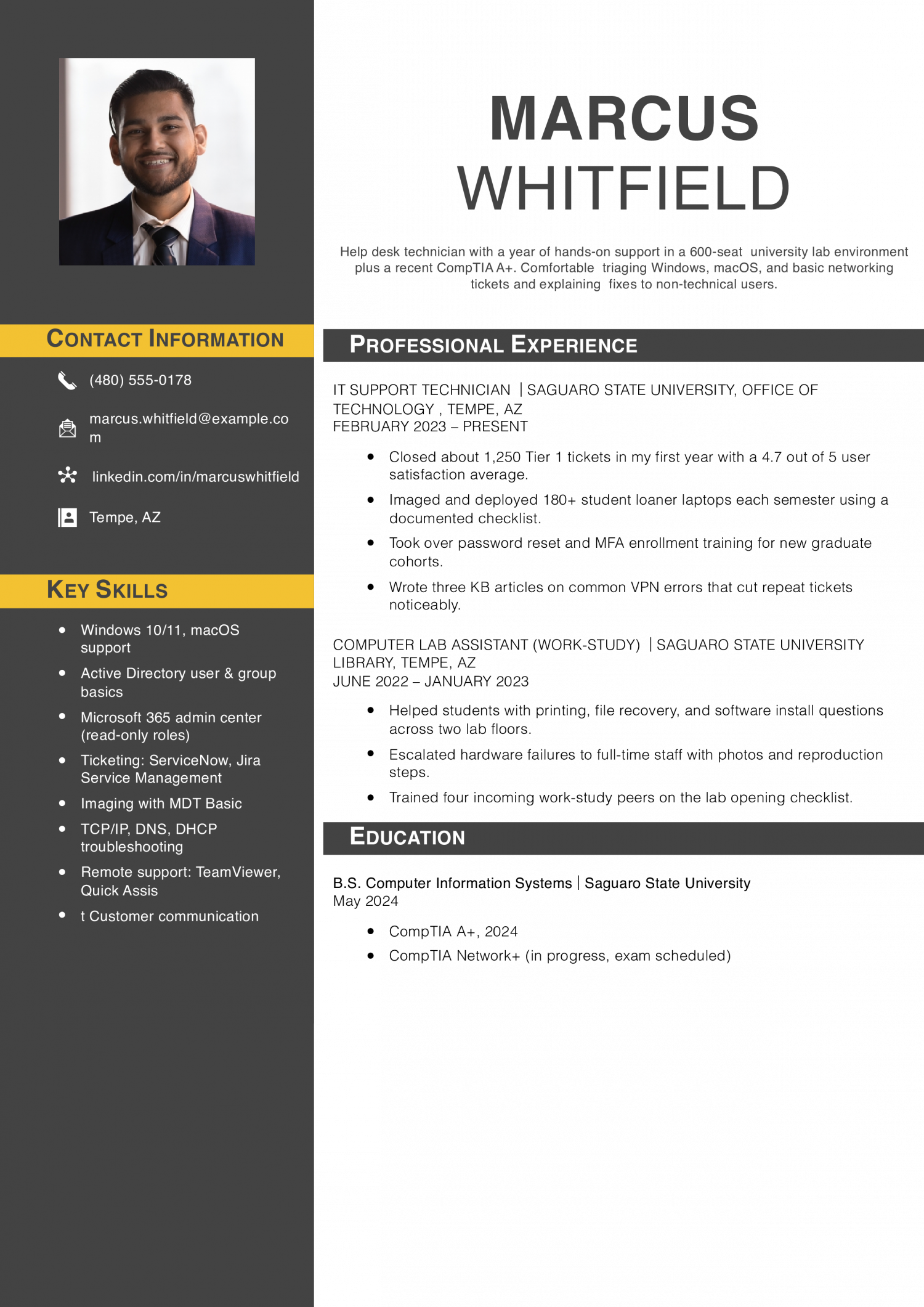
Entry-level IT covers help desk, desktop support, and junior sysadmin roles where you close tickets under an SLA. The resume needs to prove ticket volume, a CompTIA A+ or Network+ in progress or held, and hands-on time with Active Directory or M365.

Entry Level Example - Information Technology
PDF
DOCX
Use This Template
Why this resume works
  • Real ticket numbers, not guesses: Counting closed tickets and a satisfaction score gives hiring managers something concrete from a first job.
  • Certifications in progress are listed: Showing the A+ done and Network+ scheduled signals momentum without overstating credentials.
  • Wrote documentation early: KB articles and training peers are small wins that hint at future Tier 2 readiness.

Mid Career Example

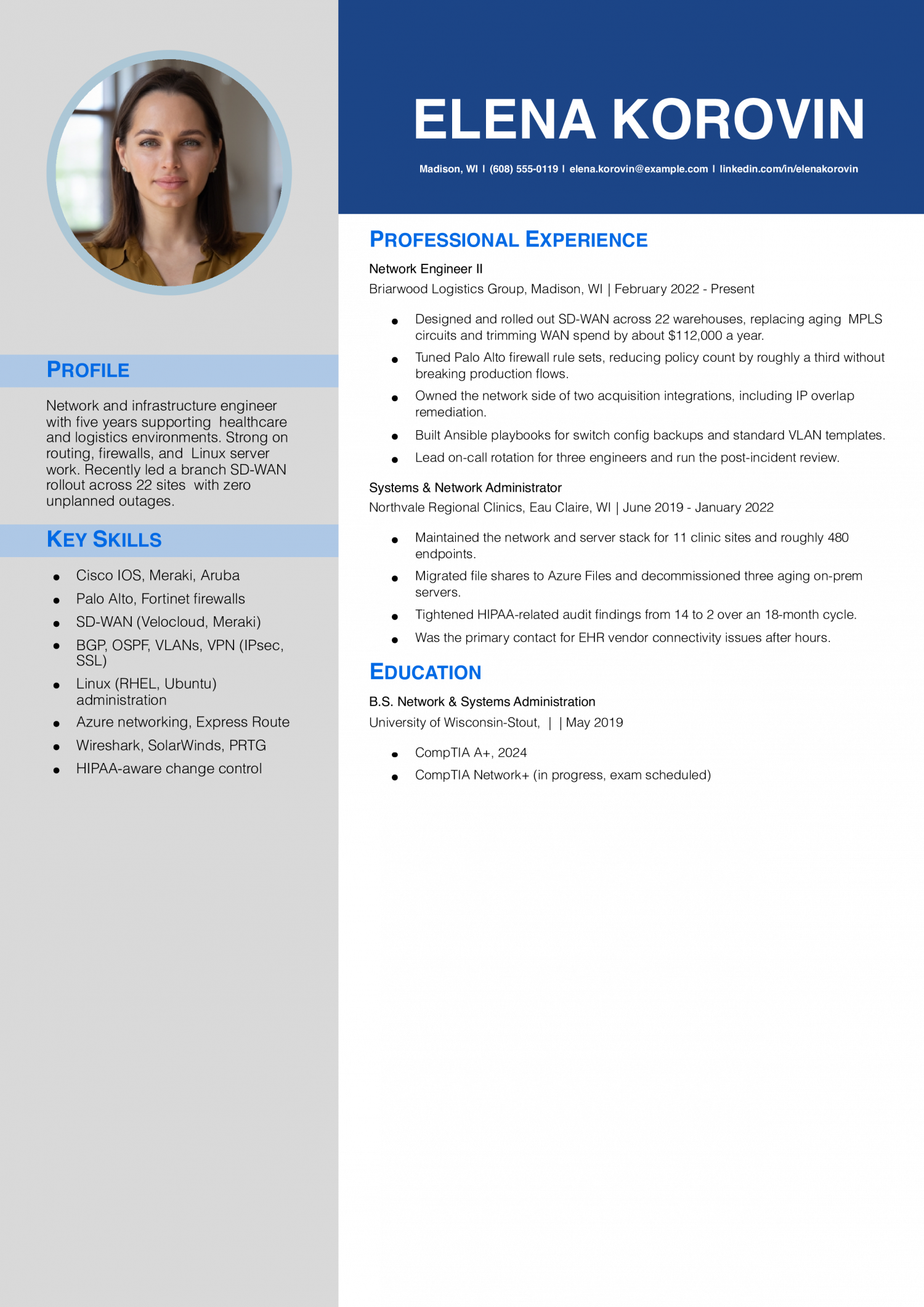
Mid-career IT covers systems administrators, network engineers, and cloud support roles owning servers, switches, or AWS and Azure tenants. The resume needs to prove uptime numbers, the stack you administer end to end, and a Security+, AWS, or Cisco cert that maps to the posting.

Mid Career Example - Information Technology
PDF
DOCX
Use This Template
Why this resume works
  • One project carries the resume: The 22-site SD-WAN rollout with cost savings gives a clear headline accomplishment a recruiter can quote.
  • Healthcare to logistics shows range: Two regulated and unregulated environments hint at adaptability without padding the bullet list.
  • Audit findings dropped: Cutting HIPAA findings from 14 to 2 shows the candidate fixes things, not just keeps the lights on.

Senior Example

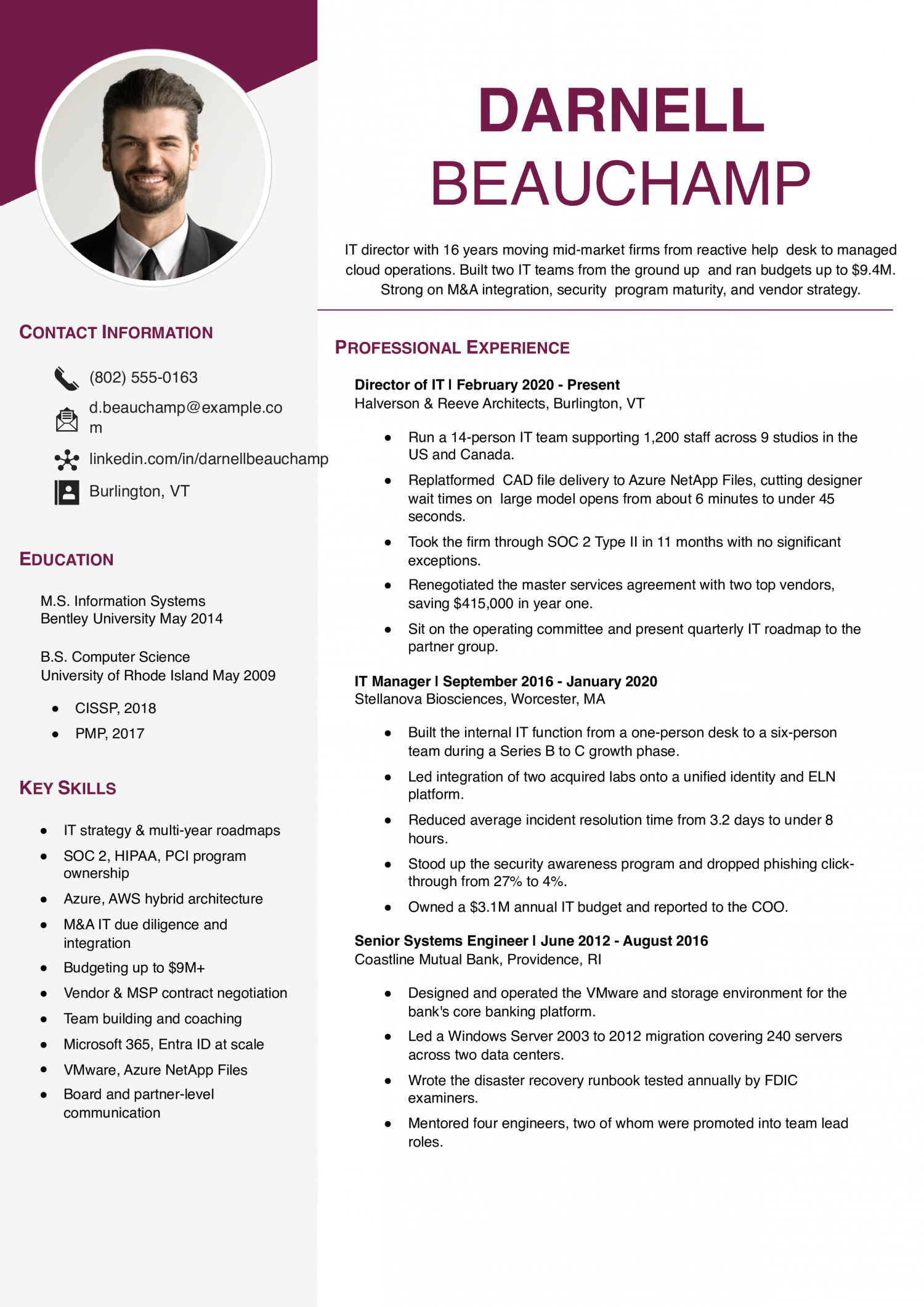
Senior IT covers infrastructure leads, IT managers, and principal engineers steering roadmaps, vendors, and on-call rotations. The resume needs to prove headcount or budget owned, platform migrations delivered, and security or compliance outcomes tied to SOC 2, HIPAA, or PCI scope.

Senior Example - Information Technology
PDF
DOCX
Use This Template
Why this resume works
  • Budget and team size are clear: Stating 14 reports, 1,200 users, and a $9.4M budget gives the role real shape at a glance.
  • Career arc moves up logically: Engineer to manager to director with bigger scope each step matches what senior hiring panels look for.
  • Security program results, not buzzwords: SOC 2 with no major exceptions and phishing click-through dropping to 4% beats generic ‘led security’ language.

Text Version Information Technology

Priya Ramanathan
Raleigh, NC | (919) 555-0142 | [email protected] | linkedin.com/in/priyaramanathan

PROFESSIONAL SUMMARY

IT systems engineer with seven years across endpoint management, cloud migration, and identity. Cut a multi-site help desk backlog from two weeks to two days after standardizing Intune and SCCM. Comfortable across Azure, AWS, and hybrid Active Directory environments, and used to working with finance and compliance stakeholders.

EXPERIENCE

Senior Systems Engineer
Linden & Foray Insurance | Raleigh, NC | 2021-Present

  • Led migration of 1,840 user mailboxes from on-prem Exchange to Microsoft 365 with under four hours of cutover downtime per region.
  • Rebuilt the patching pipeline in Intune, lifting first-pass compliance from the low 60s to around 94% in two quarters.
  • Authored the conditional access baseline now used by three sister business units.
  • Designed an Autopilot zero-touch flow that knocked roughly 90 minutes off each new-hire laptop build.
  • Mentor two junior admins on PowerShell scripting and change-control etiquette.

IT Systems Administrator
Caldwell Pierce Manufacturing | Greensboro, NC | 2018-2021

  • Stood up a hybrid AD environment across four plants, replacing a flat workgroup setup that had caused recurring outages.
  • Cut ticket volume on printer and VPN issues by roughly 40% after rolling out a standard image and Always On VPN.
  • Ran annual DR tabletop tests with plant managers and documented gaps for the CIO.
  • Owned vendor relationship for the MSP handling after-hours coverage; saved about $38,000 by renegotiating the SLA.
  • Built a quarterly access review process for shared mailboxes and privileged accounts.

Help Desk Technician II
Caldwell Pierce Manufacturing | Greensboro, NC | 2017-2018

  • Handled escalations from a five-person Tier 1 team across plant and corporate users.
  • Wrote the onboarding checklist still used for new hires at three plants.
  • Imaged and deployed about 220 laptops during the Windows 10 refresh.
  • Was the lead on-call tech during quarterly inventory cutovers.

IT Intern
Cardinal Civic Credit Union | Raleigh, NC | Summer 2017

  • Shadowed the systems admin team on patch nights and after-hours reboots.
  • Audited a 600-endpoint inventory against the asset database and flagged 47 missing assets.
  • Wrote a PowerShell script to pull stale AD accounts older than 90 days.

EDUCATION

  • B.S. Information Technology, North Carolina State University, 2018
  • Microsoft Certified: Azure Administrator Associate (AZ-104), 2022
  • Microsoft 365 Certified: Endpoint Administrator Associate (MD-102), 2023
  • CompTIA Security+, 2019

SKILLS

  • Microsoft 365 & Exchange Online
  • Intune, SCCM, Autopilot
  • Azure AD / Entra ID, Conditional Access
  • PowerShell, Bash
  • Active Directory, Group Policy
  • VMware vSphere, Hyper-V
  • Always On VPN, Palo Alto firewalls
  • Backup & DR (Veeam, Azure Site Recovery)
  • ITIL change & incident management
  • Vendor and MSP management
Use this in our builder
Copied

How to Write an Information Technology Resume

01 Open with the metric an IT director would size you up by

The first line of your summary should name the scale you operate at, not your years in IT. IT directors read scale as readiness to handle their environment.

Lead with endpoint count, ticket volume per week, uptime percentage, or users supported. A help-desk summary that opens with “Resolve 180 tickets weekly across 1,400 endpoints at 96% first-touch” reads stronger than “Five years of IT support experience.”

Pair the number with the stack: Active Directory, Intune, ServiceNow, Azure. That combination tells the reader inside 10 seconds whether your environment matches theirs.

02 Quantify every bullet with a real number

IT work generates numbers everywhere.

Anchor bullets to two or three metrics: MTTR in minutes, SLA attainment percentage, uptime percentage, tickets closed per week, endpoints or users supported, or dollar value of the project budget you ran.

A strong bullet reads: “Cut Tier 2 MTTR from 6.2 hours to 2.8 by rewriting the AD lockout runbook, lifting SLA attainment to 94%.”

03 Group your work by IT discipline

IT is not one job. Group your bullets under three or four headings so the reader can map you to the open role.

Useful buckets for this field: end-user support and ticketing, systems and identity (AD, Entra, Intune, Jamf), network and security (firewalls, VLANs, MFA, SIEM), and cloud and infrastructure (AWS, Azure, GCP, on-prem hypervisors).

Project work goes in its own block: migrations, rollouts, hardening sprints, audits. Name the scope (users, sites, endpoints) and the result (cutover hours, downtime, dollars saved).

04 Place certifications and stack on page one

IT directors and technical recruiters scan for certs and stack before they read your experience. Bury them on page two and the resume looks generic.

Build a credentials block under the summary listing CompTIA A+, Network+, Security+, AWS Solutions Architect, Azure Administrator, CCNA, or ITIL 4 with the year earned. List the cert name and issuing body, not the registration number.

Add a separate stack block: operating systems, cloud platforms, ticketing, scripting (PowerShell, Bash, Python), endpoint management, and security tools. Match the wording to the job posting so the ATS parses a clean hit.

05 Cut the lines that no longer earn space

Senior IT resumes hit a length problem. The fix is editing for what the next role needs, not what you did 12 years ago.

Cut help-desk bullets once you have five years of sysadmin or engineering work above them. Drop expired certs, deprecated tools (Windows Server 2008, on-prem Exchange 2010), and any objective statement.

Keep what proves scope: platforms you architected, headcount you led, budgets you owned, audits you passed (SOC 2, HIPAA, PCI), and migration outcomes. Two pages is the ceiling for most IT roles, even at director level. If you are aiming at a director role, see our IT director resume examples for ways to present your scope.

Most Popular Skills on Information Technology Resumes for 2026

Five years ago, an IT resume read like an alphabet soup of every tool you had ever touched. The skills below come from the resumes our users built in 2026. The mix has shifted toward named cloud platforms, identity stacks, and ticketing systems over generic “Microsoft Office” lines.

IT directors weight hard skills heavily because the role is tool-bound, but soft skills like incident communication and vendor coordination decide who runs a bridge call. Match the hard-skill list against the posting and use the soft skills as evidence backing your bullets, not as a standalone block.

Soft Skills % of resumes with this skill
Communication 69%
Problem solving 52%
Teamwork 50%
Critical thinking 40%
Adaptability 29%

And here are the top hard skills showing up most often.

Hard Skills % of resumes with this skill
Cloud computing 69%
Cybersecurity 67%
Programming languages 48%
Network administration 37%
SQL databases 30%

Based on data from thousands of IT professionals’ resumes built on ResumeTemplates.com, May 2026.

Must Have on an Information Technology Resume

The table covers help desk through cloud and security roles.

Niche Keywords for ATS Checkers

IT directors expect a niche section that maps to the sub-discipline they are hiring for. Group your keywords by specialty so the ATS and the reader can match you to the role inside a few seconds.

Niche Keywords ATS scans for
Help desk and end-user support tier 1 support, ticket triage, ServiceNow, SLA attainment
Systems and identity administration Active Directory, Entra ID, Intune, Group Policy
Network engineering Cisco IOS, Meraki, VLAN, firewall administration
Cloud and infrastructure AWS EC2, Azure Administrator, Terraform, hybrid cloud migration
Security and compliance SOC 2, HIPAA, EDR, MFA rollout

AI Skills to Add

Name the tools you actually use and what you review before pushing to production.

What AI is actually changing for this role
Ticket triage

Generative AI now drafts first-response macros and classifies inbound tickets, shifting Tier 1 work toward review and escalation judgment.

Scripting and automation

GitHub Copilot writes first-pass PowerShell and Bash, so the value moved to reading, testing, and hardening generated code.

Documentation and runbooks

Microsoft Copilot drafts knowledge-base articles from ticket history, which raises the bar on accuracy review and version control.

Incident summarization

AI assistants summarize bridge calls and Slack threads into post-incident reports, freeing engineers for root-cause analysis.

AI tools to name

  • GitHub Copilot: First-pass PowerShell, Bash, and Python for automation, with engineer review before production.
  • Microsoft Copilot for M365: Drafts knowledge-base articles, ticket summaries, and policy documents from tenant data.
How to phrase AI on your resume
Do
  • Used GitHub Copilot to draft PowerShell automation for AD account provisioning, cutting onboarding time from 22 minutes to 6 per new hire.
  • Deployed Microsoft Copilot for M365 across a 1,200-seat tenant, training help-desk staff on prompt patterns and reviewing 40+ AI-generated KB articles for accuracy.
Skip
  • AI-powered IT visionary transforming enterprise infrastructure
  • Leveraged next-gen AI to revolutionize ticket resolution

Tech Stack to List on an IT Resume

IT directors scan the stack block before they read your bullets. List the tools you actually administer, grouped by category, and match the spelling to the target posting.

  • Operating systems: Windows 11, Windows Server 2019/2022, macOS, Ubuntu, RHEL
  • Cloud: AWS (EC2, S3, IAM), Azure (Entra ID, Intune, AVD), GCP
  • Identity and endpoint: Active Directory, Entra ID, Intune, Jamf, Group Policy
  • Networking: Cisco IOS, Meraki, Palo Alto, Fortinet, VLANs, VPN
  • Ticketing and ITSM: ServiceNow, Jira Service Management, Freshservice, ITIL 4
  • Scripting and automation: PowerShell, Bash, Python, Terraform, Ansible
  • Security: CrowdStrike, SentinelOne, Splunk, Microsoft Defender, MFA (Duo, Okta)

Information Technology Credentials That Get You the Job

A CompTIA A+ or equivalent fundamentals cert keeps you eligible for most help-desk and junior roles. The certifications below are what move an IT resume from the qualified-but-typical stack into the shortlist an IT director actually interviews. List the cert name, issuing body, and year earned on one line.

  • CompTIA Security+: The baseline security cert federal contractors and mid-market employers screen for; pairs well with any sysadmin or network role.
  • AWS Certified Solutions Architect (Associate): Signals you can design and run workloads on AWS, which moves you from support tickets into cloud engineering tracks.
  • Microsoft Certified: Azure Administrator Associate (AZ-104): The cert M365 and Azure shops weight most for sysadmin and cloud admin hires; expect it to come up in the technical screen.
  • Cisco Certified Network Associate (CCNA): Still the standard for network engineering hires; signals routing, switching, and security fundamentals at the enterprise level.
Written by professional resume writers and loved by hiring managers

Resume Templates offers HR approved resume templates to help you create a professional resume in minutes. Choose from several template options and even pre-populate a resume from your profile.

Build My Resume

Frequently Asked Questions

Should I write "IT" or "Information Technology" on my resume?

Use both forms on the same resume. Spell out "Information Technology" once in your summary or a section header.

Then use "IT" through the bullets and the skills block. ATS parsers index both forms, and recruiters skim the acronym faster than the full phrase.

How do I write an IT resume with no professional experience?

Lead the resume with your CompTIA A+, Google IT Support, or Network+ cert and your degree or bootcamp.

Then list home-lab projects, internships, and any volunteer help-desk work with ticket counts. Name the tools you actually ran: VirtualBox, pfSense, Active Directory, Intune, PowerShell.

A home lab with three documented projects often beats a generic "seeking entry-level IT role" objective. IT directors read it as proof you self-teach.

How do I move from a warehouse or non-IT job into an IT resume?

Pull the transferable signals into one short line: inventory systems, RF scanners, WMS troubleshooting, barcode printers, shift handoffs.

Build the rest of the resume around your CompTIA A+ or Google IT Support cert, a home lab you can demo, and any internal IT support you did informally (resetting kiosks, swapping printers, training new hires on the WMS).

Lead the summary with the cert and the target role, not the warehouse title. The reader needs to see IT intent in the first line.

What keywords should an IT resume include?

Mirror the target posting first. If the role lists "Entra ID," "Intune," and "ServiceNow," use those exact strings.

Then layer in the ATS staples most IT roles share: Active Directory, Microsoft 365, Azure or AWS, PowerShell, ITIL, endpoint management, SLA, MTTR, incident response.

Spell each acronym out once ("Multi-Factor Authentication (MFA)") so the parser indexes both forms.

What's the best resume template for an IT professional?

Recruiters can find your certifications and the systems you use each day on a tech template. For another option, consider an ATS-friendly template.

Rate this article

Information Technology Resume

Average Rating

4.8/5 stars with 169 reviews

You have given 0 Star(s)
4.8/5 stars with 169 reviews

Check Out Related Examples

Professional Entry-Level and Student Resume Example
100+ Tech Resume Templates and Examples for 2026

Andrew Stoner By: Andrew Stoner
Featured Example
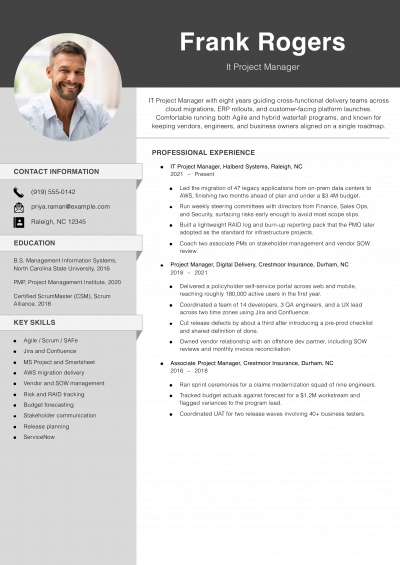
4 Best IT Project Manager Resume Examples and Templates for 2026
Andrew Stoner By: Andrew Stoner
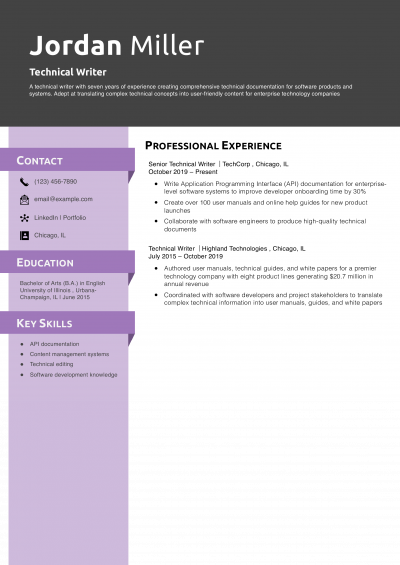
Technical Writer
4 Best Technical Resume Examples and Templates for 2026
Andrew Stoner By: Andrew Stoner
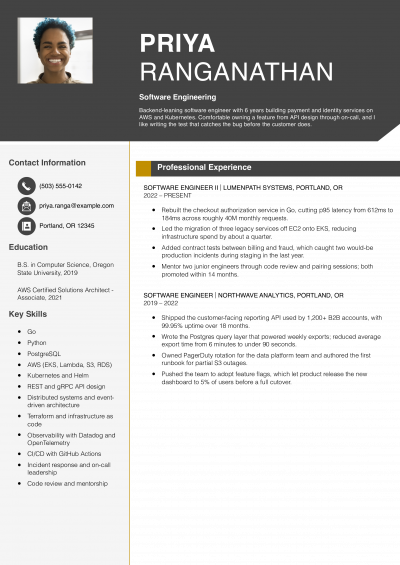
Featured Example - Software Engineering
4 Best Software Engineer Resume Examples and Templates for 2026
Andrew Stoner By: Andrew Stoner
Featured Example
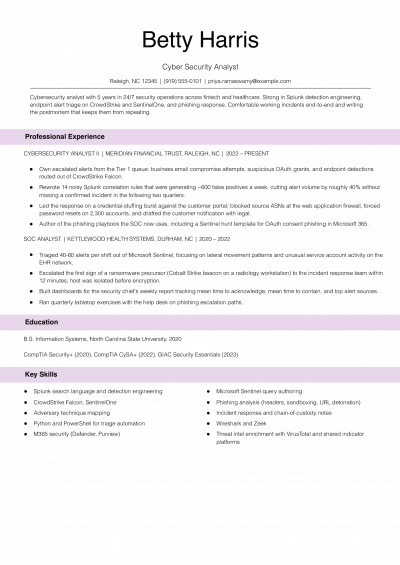
Cyber Security Analyst Resume Examples and Templates for 2026
Andrew Stoner By: Andrew Stoner
Featured Example
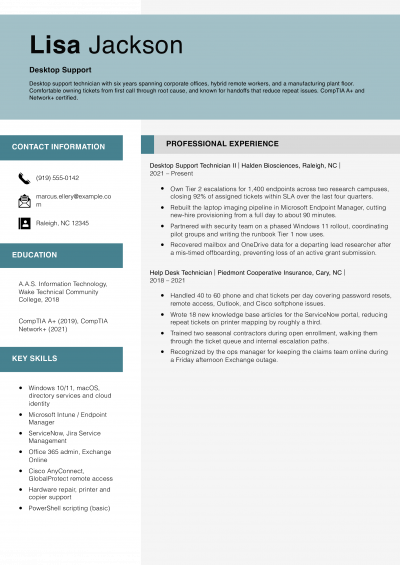
Desktop Support Resume Examples and Templates for 2026
Andrew Stoner By: Andrew Stoner
Featured Example
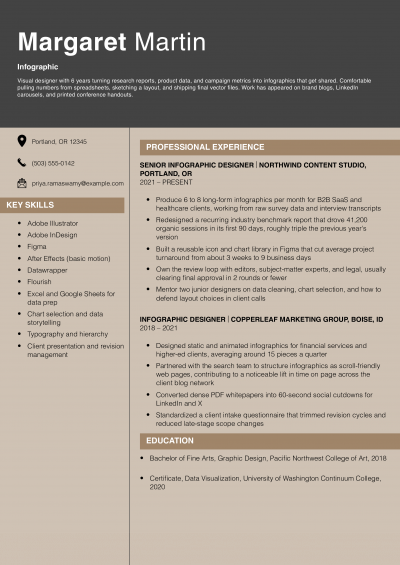
Infographic Resume Examples and Templates for 2026
Andrew Stoner By: Andrew Stoner
Andrew Stoner
Andrew Stoner

Executive Resume Writer and Career Coach

Andrew Stoner is an executive career coach and resume writer with 17 years of experience as a hiring manager and operations leader at two Fortune 500 Financial Services companies, and as the career services director at two major university business schools.
Teenager Resume Example – Academic and STEM Interest
Get Started Now
Excellent Excellent
4.7 STARS on 4.7 STAR
flash image Get the 2x more job offers*
ResumeTemplates.com LOGO
Trustpilot

Elevate your career with insider job advice and expert resume templates.

Build Your Resume
  • AI Resume Builder
  • Resume Builder App
  • Action Verbs, Power Words, and Strong Synonyms to Use on Your Resume
  • How Long Should a Resume Be?
  • How To Make a Resume
  • Key Skills Examples for Your Resume
Essential Resume Guides
  • Are Resume Templates a Good Idea?
  • How to List Work Experience on a Resume
  • How To Fill Out a Resume Template
  • How To Use a Resume Template for Free
About Resume Templates
  • About Us
  • Contact Us
  • Privacy Policy
  • Terms of Service
  • Do Not Sell or Share

© 2026 Resumetemplates.com All rights reserved.