ResumeTemplates.com LOGO
  • Resume Templates
      TOP RESUME TEMPLATES
    • College
    • Combination
    • Stylish
    • Technology
    • Minimalist
    • Functional
    • Professional
    • Google Docs
    • Hybrid
    • ATS Friendly
    • Chronological
    • Microsoft Word
    • Traditional
    • Creative
    • Basic
    • General
    • Skills Based
    • Modern
    • Use our free resume templates tool
      Examples of resumes in our free resume builder tool

      When choosing a resume template, the priority should be a clean, professional look that can focus on your career accomplishments.

      Build My Resume
      View all 100+ Resume Templates
  • Resume Builder App
  • Resume Examples
      TOP RESUME EXAMPLES
    • Software Engineer
    • Registered Nurse
    • Sales
    • Customer Service Representative
    • Software Developer
    • Accountant
    • Coaching Resume
    • Product Manager
    • Teacher
    • Medical Assistant
    • Information Technology
    • Project Manager
    • Administrative Assistant
    • Bartender
    • Use our free resume templates tool
      Examples of resumes in our free resume builder tool

      When choosing a resume template, the priority should be a clean, professional look that can focus on your career accomplishments.

      Build My Resume
      View all 100+ Resume Examples
  • Resources
      Top Resources
    • Adding Your Writing Skills on a Resume
    • Bartender Job Description for a Resume
    • Best Resume File Formats
    • Effective Communication Skills for Resume With Examples, Tips, and Guide
    • Functional vs. Chronological Resume
    • Google Docs Resume Templates
    • Hobbies and Interests for Resumes
    • How Far Back Should a Resume Go?
    • How Much Does a Resume Builder Cost?
    • How To Demonstrate Organizational Skills
    • How To Edit a Resume Template in Word
    • How To Include Salary Requirements in Resumes
    • How To Insert a Picture in a Google Doc Resume Template
    • How to List Projects on a Resume
    • How To List Your Education on a Resume
    • How To Make a Resume
    • How To Make a Resume With No Job Experience
    • How to Make Your Resume Stand Out and Land Your Dream Job
    • How To Nail an Impressive Beginner Resume Summary
    • How To Present Your Accomplishments on a Resume
    • How To Say You’re a Quick Learner on Your Resume
    • How To Say You’re a Subject Matter Expert on a Resume
    • How To Upload Your Resume to Indeed
    • How To Write a Business Resume
    • How To Write a Cover Letter for a Resume
    • How To Write an Impressive Resume With Only One Job
    • How To Write a Resume Summary
    • How To Write a Student Resume
    • How To Write an Address on One Line
    • Key Skills Examples for Your Resume
    • Listing Udemy Certificates on a Resume
    • Make a Resume in Microsoft Word
    • Putting Coursera Certificates on a Resume
    • Resume Buzzwords and Cliches To Avoid
    • Resume Header Examples
    • Resume Icons, Logos, and Symbols
    • Resume Introduction And Intro Paragraph Examples
    • Resume Objective Examples
    • Resume Punctuation
    • Resume Vs. Curriculum Vitae
    • Should I Put My GPA on My Resume And How To List It
    • Summary of Qualifications for a Resume
    • The Best Color for Your Resume
    • The Complete Guide To Listing a U.S. Military Address on Your Resume
    • Types of Resume Templates
    • What Resume Template Do Employers Prefer?
    • What Template Should I Use for a Federal Resume?
    • What To Put on a Resume
    • Where To Find Free Resume Templates
    • Where To Post Your Resume for Remote Work
    • Write a Resume With No Experience
    • See all Resources
  • Research
      RESEARCH
    • 4-Day Work Week Survey
    • AI Hiring Survey
    • AI Lay Off Survey
    • AI Manager Survey
    • ChatGPT and Skill Assessments
    • ChatGPT Competence Survey
    • ChatGPT Contributes to Raises
    • Companies Increase In-Office Days
    • Companies Offer Lower Salaries YoY
    • Companies Reduce Salaries and Benefits
    • Companies Replace Workers With AI
    • Cost-of-Living Survey
    • DEI Survey
    • Employee Coffee-Badging
    • Employee Layoffs
    • Gen Z Interview Survey
    • Gen Z Worker Parents Survey
    • Hard and Soft Skills Hiring Survey
    • Hiring Managers Favor AI Skills
    • Hiring Managers Pass on Bad Resumes
    • Hiring Report
    • Listing Pronouns on Resumes
    • Lying on Resumes
    • Manager Gen Z Survey
    • Rehiring Workers Survey
    • See All Research Reports
  • Resources
      Top Resources
    • How To Fill Out A Resume Template
    • Guides and AdviceRESEARCH
    • Adding Your Writing Skills on a Resume
    • Bartender Job Description for a Resume
    • Best Resume File Formats
    • Effective Communication Skills for Resume With Examples, Tips, and Guide
    • Functional vs. Chronological Resume
    • Google Docs Resume Templates
    • Hobbies and Interests for Resumes
    • How Far Back Should a Resume Go?
    • How Much Does a Resume Builder Cost?
    • How To Demonstrate Organizational Skills
    • How To Edit a Resume Template in Word
    • How To Include Salary Requirements in Resumes
    • How To Insert a Picture in a Google Doc Resume Template
    • How to List Projects on a Resume
    • How To List Your Education on a Resume
    • How To Make a Resume
    • How To Make a Resume With No Job Experience
    • How to Make Your Resume Stand Out and Land Your Dream Job
    • How To Nail an Impressive Beginner Resume Summary
    • How To Present Your Accomplishments on a Resume
    • How To Say You’re a Quick Learner on Your Resume
    • How To Say You’re a Subject Matter Expert on a Resume
    • How To Upload Your Resume to Indeed
    • How To Write a Business Resume
    • How To Write a Cover Letter for a Resume
    • How To Write an Impressive Resume With Only One Job
    • How To Write a Resume Summary
    • How To Write a Student Resume
    • How To Write an Address on One Line
    • Key Skills Examples for Your Resume
    • Listing Udemy Certificates on a Resume
    • Make a Resume in Microsoft Word
    • Putting Coursera Certificates on a Resume
    • Resume Buzzwords and Cliches To Avoid
    • Resume Header Examples
    • Resume Icons, Logos, and Symbols
    • Resume Introduction And Intro Paragraph Examples
    • Resume Objective Examples
    • Resume Punctuation
    • Resume Vs. Curriculum Vitae
    • Should I Put My GPA on My Resume And How To List It
    • Summary of Qualifications for a Resume
    • The Best Color for Your Resume
    • The Complete Guide To Listing a U.S. Military Address on Your Resume
    • Types of Resume Templates
    • What Resume Template Do Employers Prefer?
    • What Template Should I Use for a Federal Resume?
    • What To Put on a Resume
    • Where To Find Free Resume Templates
    • Where To Post Your Resume for Remote Work
    • Write a Resume With No Experience
    • Research
    • 4-Day Work Week Survey
    • AI Hiring Survey
    • AI Lay Off Survey
    • AI Manager Survey
    • ChatGPT and Skill Assessments
    • ChatGPT Competence Survey
    • ChatGPT Contributes to Raises
    • Companies Increase In-Office Days
    • Companies Offer Lower Salaries YoY
    • Companies Reduce Salaries and Benefits
    • Companies Replace Workers With AI
    • Cost-of-Living Survey
    • DEI Survey
    • Employee Coffee-Badging
    • Employee Layoffs
    • Gen Z Interview Survey
    • Gen Z Worker Parents Survey
    • Hard and Soft Skills Hiring Survey
    • Hiring Managers Favor AI Skills
    • Hiring Managers Pass on Bad Resumes
    • Hiring Report
    • Listing Pronouns on Resumes
    • Lying on Resumes
    • Manager Gen Z Survey
    • Rehiring Workers Survey
    • Resources
    • See all Resources
  • My Account
  • Use our free resume templates tool
    Examples of resumes in our free resume builder tool

    When choosing a resume template, the priority should be a clean, professional look that can focus on your career accomplishments.

Build My Resume
Build My Resume
Home / Resume Examples / 4 Best User Experience (UX) Designer Resume Examples and Templates for 2026

4 Best User Experience (UX) Designer Resume Examples and Templates for 2026

Andrew Stoner
By Andrew Stoner
Andrew Stoner
Executive Resume Writer and Career Coach linkedin
Andrew Stoner
, Executive Resume Writer and Career Coach
Last Updated: October 30, 2026

Every resume example is written and reviewed by our team of Certified Professional Resume Writers to ensure top-quality content and formatting.

The AI shift hit UX design fast. Figma drafts wireframes, ChatGPT spits out flows, and hiring teams expect you to show how you use these tools. Employers are still hiring, but you're up against a deep stack of portfolios.

To stand out, your resume needs end-to-end ownership tied to measurable outcomes. Pair it with a portfolio link and case studies covering the problem, your process, and the result.

We reviewed how recruiters screen UX resumes and pulled the patterns that get callbacks. The examples below cover product UX, UX research, and interaction design, from junior to lead.

UX Designer

Build your User Experience UX Designer resume

Customize this template in our builder in under 10 minutes.

Build my resume
Excellent Excellent
4.7 STARS on 4.7 STAR
flash image Get the 2x more job offers*
On this page
On this page
  • Featured Example
    • Junior UX Example
    • Senior UX Example
    • Lead UX Example
    • Text Version User Experience UX Designer
  • How to Write an User Experience UX Designer Resume
    • 01 Open with the one thing a design director cannot find elsewhere
    • 02 Translate UX work into outcome metrics
    • 03 Group your work by deliverable category
    • 04 Place tools and credentials on page one
    • 05 Close with education and a portfolio anchor
  • Most Popular Skills on User Experience UX Designer Resumes for 2026
  • Must Have on an User Experience UX Designer Resume
    • Niche Keywords for ATS Checkers
    • AI Skills to Add
    • AI tools to name
    • Portfolio Strategy
  • Tools to Name on a UX Designer Resume
  • Awards, Speaking, and Published Work
  • User Experience Design Credentials That Get You the Job
  • Latest BLS Statistics for UX Designers
    • Top-paying states
    • Highest-employment states
  • Frequently Asked Questions
linkedin
twitter
facebook
Tip !

A portfolio link with case studies tied to outcomes is what gets UX designer resumes past the recruiter screen; named research methods and shipped Figma work are what make them readable enough to advance to a design director.

Andrew Stoner , Executive Resume Writer and Career Coach

Featured Example

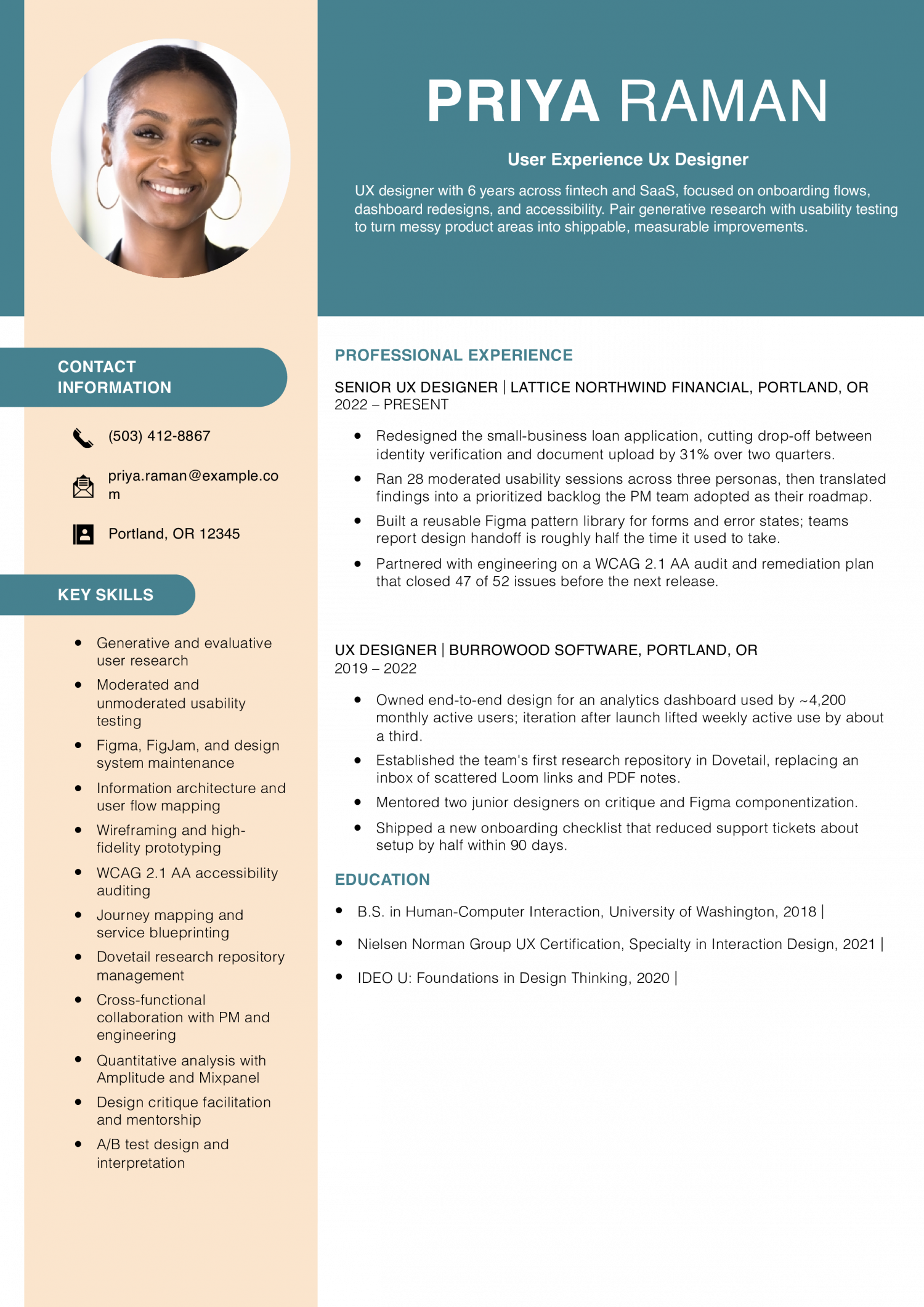
Featured Example - User Experience UX Designer
PDF
DOCX
Use This Template
Why this resume works
  • Numbers tied to user behavior: Each bullet points to a measured outcome like drop-off, ticket volume, or active use rather than vague impact language.
  • Shows research and design together: Usability sessions, accessibility audits, and pattern libraries all appear, signaling the full UX skill set rather than visual design alone.
  • Grew into more responsibility: The jump from UX Designer to Senior UX Designer is reinforced by mentoring and owning a pattern library, not just a title bump.
Jump to a separate text resume example ↓

Junior UX Example

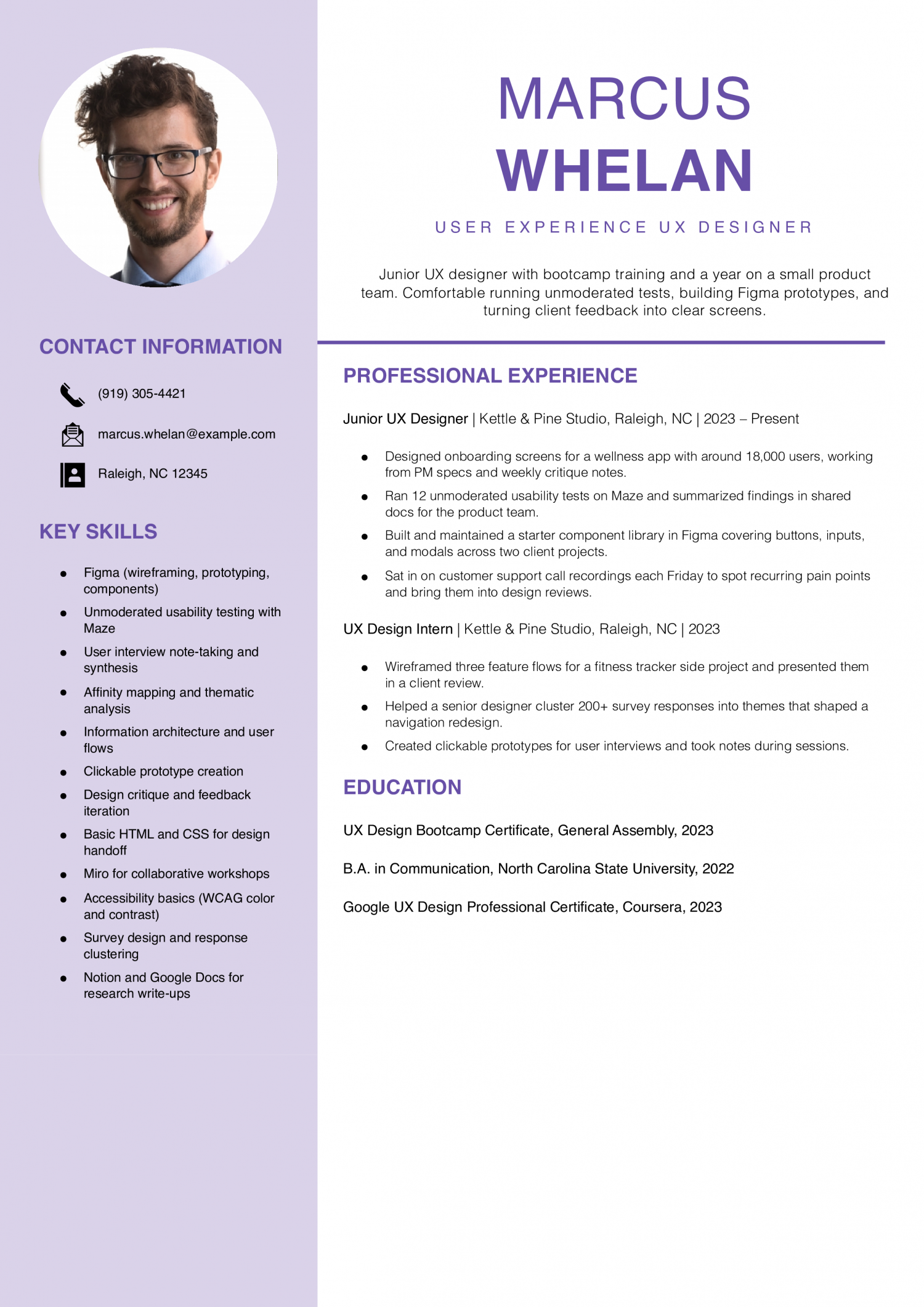
Junior UX designers have 0 to 2 years on a product team, often coming from bootcamps, transitions, or design degrees. The resume needs to prove you can run a usability test, ship a Figma flow, and read research notes.

Junior UX Example - User Experience UX Designer
PDF
DOCX
Use This Template
Why this resume works
  • Real product work, not just school: Bullets reference live users, PM specs, and client reviews, showing the candidate has touched shipped work.
  • Specific tools named: Figma and Maze appear with what they were used for, which makes the skills feel earned rather than listed.
  • One number anchors the resume: The 18,000 user figure gives hiring managers a sense of scale without overclaiming impact for a junior.

Senior UX Example

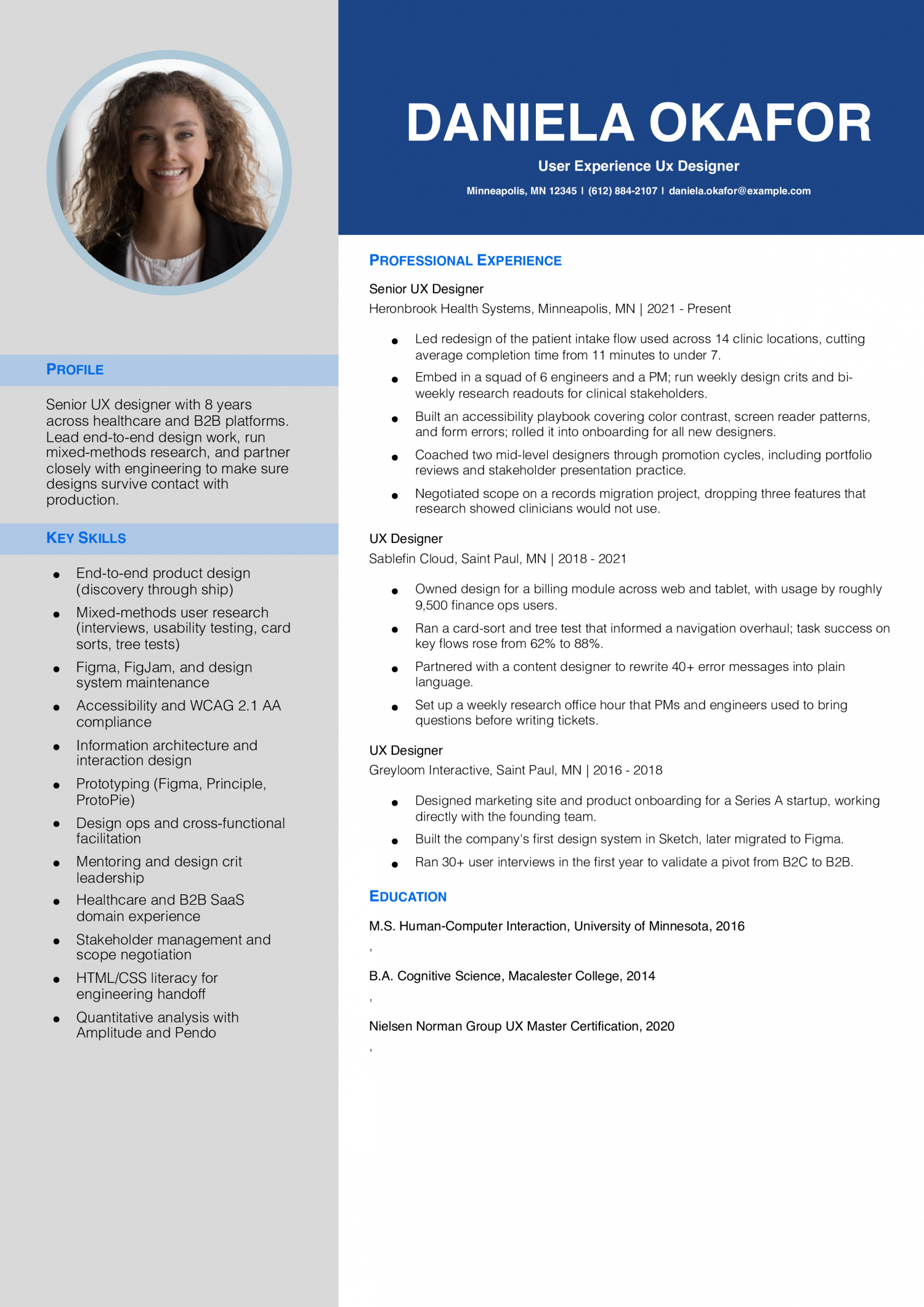
Senior UX designers own features end-to-end and partner with PMs and engineers across a release cycle. The resume needs to prove validated UI shipped to production, measured usability gains, and ownership of a research method.

Senior UX Example - User Experience UX Designer
PDF
DOCX
Use This Template
Why this resume works
  • Big outcomes with hard numbers: Intake time dropping from 11 to 7 minutes and task success jumping to 88% give recruiters something concrete to point to.
  • Mentoring shows up clearly: Coaching two designers through promotion is the kind of senior-level signal hiring managers look for.
  • Cut work that did not help: Dropping three features based on research shows judgment, not just output.

Lead UX Example

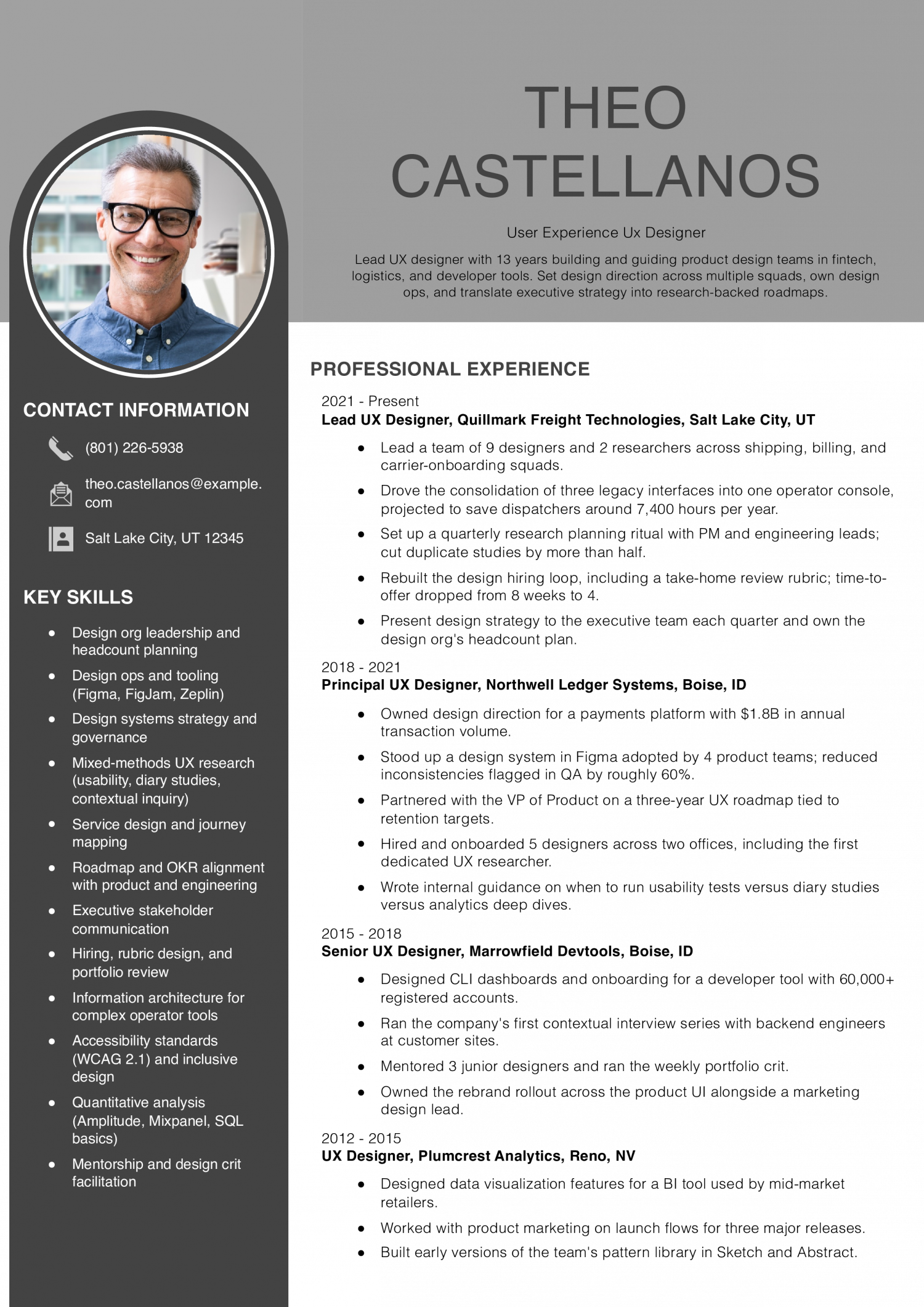
Lead UX designers set design direction, mentor designers, and own a design system or a product area. The resume needs to prove cross-team influence, hiring or mentoring outcomes, and impact on conversion, retention, or task success.

Lead UX Example
PDF
DOCX
Use This Template
Why this resume works
  • Manages people and design ops: Leading 9 designers and 2 researchers, plus owning the hiring loop, frames this as a true leadership role rather than an IC-plus.
  • Connects design to business numbers: $1.8B in transaction volume and 7,400 hours saved per year tie design choices to outcomes executives care about.
  • Career arc reads cleanly: Senior to Principal to Lead is a coherent progression, with scope growing at each step rather than parallel moves.

Text Version User Experience UX Designer

Aisha Bergstrom
Pittsburgh, PA | (412) 559-7714 | [email protected] | linkedin.com/in/aishabergstrom

PROFESSIONAL SUMMARY

UX designer with 9 years across consumer mobile, enterprise SaaS, and nonprofit platforms. Combine generative research, interaction design, and design system work to ship features that hold up after launch. Comfortable working with PMs, engineers, content designers, and executive stakeholders.

EXPERIENCE

Senior UX Designer
Verridian Public Media | Pittsburgh, PA | 2022-Present

  • Redesigned the member donation flow across web and iOS, lifting monthly recurring gifts by 24% in the first two quarters after launch.
  • Lead generative research for the streaming app, including 18 in-home interviews with members aged 55+.
  • Built and maintain the org’s Figma design system, covering 130+ components used by 4 product teams.
  • Coach two mid-level designers on research planning and stakeholder presentations.
  • Partner with the accessibility lead on a WCAG 2.2 roadmap that closed all known critical issues by end of year one.

UX Designer
Coppervale Health Tech | Cleveland, OH | 2019-2022

  • Owned design for a clinician scheduling tool used in 22 outpatient clinics.
  • Ran a diary study with nurses that reframed the team’s understanding of shift-swap pain points.
  • Reduced support tickets for the appointment-booking widget by about 40% after a single round of redesign and testing.
  • Mentored a junior designer through their first solo feature launch.

Product Designer
Junipercast Media | Cleveland, OH | 2017-2019

  • Designed podcast discovery features for an app with around 350,000 monthly active listeners.
  • Ran weekly usability tests during a 12-week navigation overhaul.
  • Worked with engineering on a dark mode rollout that became the default for 60% of users within three months.
  • Built early style guide documentation in Notion and Figma.

Junior UX Designer
Tindalwood Education | Erie, PA | 2015-2017

  • Designed assessment flows for a K-12 reading platform piloted in 9 school districts.
  • Helped run classroom observation sessions with teachers and students.
  • Translated paper sketches from teachers into clickable Figma prototypes for stakeholder review.
  • Created icon sets and illustration assets used across marketing and product.

UX Design Intern
Tindalwood Education | Erie, PA | 2015

  • Supported a senior designer on user interviews with elementary school teachers.
  • Drafted wireframes for a parent-facing progress report feature.
  • Took notes during weekly design critiques and shared themes back with the team.

EDUCATION

  • B.F.A. Communication Design, Carnegie Mellon University, 2015
  • Interaction Design Foundation, UX Research Certification, 2019

SKILLS

  • Figma and FigJam
  • User interviews and diary studies
  • Usability testing (moderated and unmoderated)
  • Maze, Dovetail, UserTesting
  • Design systems and component libraries
  • WCAG 2.1 and 2.2 accessibility
  • Information architecture and card sorting
  • Prototyping (low to high fidelity)
  • Cross-functional facilitation
  • Mentoring and design critique
Use this in our builder
Copied

How to Write an User Experience UX Designer Resume

01 Open with the one thing a design director cannot find elsewhere

Add a single line a design director cannot infer from a portfolio thumbnail. Name the specialty that separates you from the next Figma user in the stack.

That could be design systems ownership, accessibility audits at WCAG 2.2 AA, generative research with 30-plus participants, or shipping for native iOS and Android. Lead with the one your target role rewards, then back it up with the company and the product surface.

02 Translate UX work into outcome metrics

Recruiters scan for the measurable lift first, then look at what you did to earn it.

Most strong UX resumes name two or three of these: task success rate, time-on-task reduction, conversion lift, NPS or SUS movement, support-ticket drop, and onboarding completion. Tie each metric to the test method and sample size so the result reads as research, not a guess.

03 Group your work by deliverable category

Cluster bullets under the work product, not the project name. Design directors scan for category coverage before reading line by line.

Use four buckets: discovery and research (interviews, usability tests, surveys), interaction and visual design (wireframes, prototypes, design system components), validation (A/B tests, tree tests, analytics review), and cross-functional delivery (PM specs, engineering handoff, QA pairing). Name the artifact in each bullet so the reader sees the output.

04 Place tools and credentials on page one

Put a tools line directly under your summary: Figma, FigJam, Maze, Dovetail, Lookback, plus any code literacy like HTML, CSS, or React reads. Design directors want this visible before they scroll.

Stack certifications below education: NN/g UX Certification, Interaction Design Foundation course completions, IDEO U, or Coursera Google UX. Add the issuing body and the year so the reader can date your training against your role history.

05 Close with education and a portfolio anchor

End with education, then a one-line portfolio URL that resolves to case studies, not a Dribbble shot wall. The portfolio link belongs in the header too, but repeating it at the close gives a tired reader a second prompt.

If you are mid-career or career-changing, add a short transition line under education naming the discipline you came from (research, graphic design, front-end, product management) and the bridge project that proves the move.

Most Popular Skills on User Experience UX Designer Resumes for 2026

Five years ago, a UX designer resume read like a Sketch and wireframe checklist. The skills below come from the resumes our users built in 2026. The mix has shifted toward research methods, design systems, and measurable usability outcomes.

Design directors weigh hard skills first for screening, then read soft skills as evidence backing your bullets. Collaboration claims need a PM or engineer mentioned by function. Match the hard-skills list against your target job posting and treat soft skills as proof points inside your bullets, not standalone labels.

Soft Skills % of resumes with this skill
Communication 71%
Problem-solving 65%
Empathy 44%
Collaboration 36%
Active listening 27%

And here are the top hard skills showing up most often.

Hard Skills % of resumes with this skill
User research 70%
Wireframing and prototyping 68%
Information architecture 48%
Interaction design 39%
Usability testing 27%

Based on data from thousands of UX designers’ resumes built on ResumeTemplates.com, May 2026.

Must Have on an User Experience UX Designer Resume

Pick the terms that fit the design work you want.

Niche Keywords for ATS Checkers

Design directors and product managers expect your skills block to reflect the sub-niche your target posting names. Match the cluster below that fits your last 18 months of shipped work.

Niche Keywords ATS scans for
Product UX feature design, end-to-end ownership, prd collaboration, sprint design
UX research user interviews, usability testing, dovetail, research synthesis
Design systems component library, design tokens, figma variables, accessibility audit
Service and enterprise UX service blueprint, journey mapping, workflow design, b2b saas
Conversion and growth UX a/b testing, onboarding flow, funnel optimization, amplitude

AI Skills to Add

Show design directors how AI tools fit your design process, and name the decisions you still make by hand.

What AI is actually changing for this role
Research synthesis

Tools like Dovetail AI and ChatGPT cluster interview transcripts and surface themes, cutting synthesis time on 20-plus interviews.

Wireframe and flow drafting

Figma AI and Uizard turn prompts into low-fidelity flows, shifting designer time from drawing rectangles to validation.

Usability test analysis

Maze AI tags task failures and sentiment in unmoderated test recordings, letting designers run larger studies per sprint.

Design system maintenance

AI plugins audit components for token drift and accessibility contrast, replacing manual library reviews on each release.

AI tools to name

  • Figma AI: Use for first-pass wireframes, layer renaming, and design system audits on existing files.
  • Maze AI: Use for unmoderated usability test setup and analysis on tree tests, prototypes, and surveys.
How to phrase AI on your resume
Do
  • Used Maze AI to analyze 42 unmoderated usability sessions in one sprint, cutting synthesis from 6 hours to 90 minutes.
  • Drafted onboarding flow wireframes with Figma AI, then validated with 12 moderated interviews before engineering handoff.
Skip
  • AI-first UX designer reimagining the future of human-centered design.
  • Leveraging generative AI to revolutionize user experience workflows.

Portfolio Strategy

The portfolio link carries more weight than any bullet on your UX resume. Pick a platform that loads fast, shows case studies in order, and lets you password-protect work under NDA.

#1 Best overall Custom domain on Framer or Webflow

Full control over case study layout, password gating, and page speed.

#2 Fastest to ship Notion or Read.cv

Clean reading experience for case study writeups, low setup time, easy to update.

#3 Strong for visuals Squarespace or Cargo

Better for visual-heavy case studies if your work leans on craft and motion.

Skip Dribbble or Behance only

Reads as shot-driven, not problem-driven; use as a supplement, not the primary link.

Lead with three to five case studies, not 12. Design directors skim the first two before deciding whether to read further.

Each case study should answer four questions in order: what was the problem, what did you do, what shipped, and what changed for users. Add a one-line outcome summary above the four so a reader who only scrolls the top of the page still gets the signal.

If you have NDA work, write the case study as a process narrative with sanitized artifacts and offer the full version on request. A locked link with a contact note reads better than a missing case study.

Tools to Name on a UX Designer Resume

These are the tools that show up most often in 2026 UX postings. Name the ones you have used in production, not the ones you have demoed.

  • Figma, FigJam, and Figma variables for design and tokens
  • Maze, UserTesting, or Lookback for usability testing
  • Dovetail or Notion for research repositories and synthesis
  • Amplitude, Mixpanel, or Hotjar for behavioral analytics
  • Storybook and Zeplin for design system documentation and handoff
  • HTML, CSS, and basic React for engineering collaboration

Awards, Speaking, and Published Work

A short recognition block tells design directors you are visible in the craft community. Keep it tight and recent.

  • Conference talks at Config, UXDX, Interaction, or Awwwards with the year and session title
  • Published case studies on Smashing Magazine, A List Apart, UX Collective, or Nielsen Norman Group
  • Design awards from Awwwards, Fast Company Innovation by Design, or Communication Arts
  • Open source contributions to design systems like Polaris, Carbon, or Material with a link
  • Workshops taught at General Assembly, Designlab, or internal company programs with attendance scale

User Experience Design Credentials That Get You the Job

Use the full name of each UX credential you hold.

  • Nielsen Norman Group UX Certification: The strongest signal of formal UX training; name your specialty area (Interaction Design, UX Management, or Research) on the line.
  • Interaction Design Foundation Course Certificates: Useful for self-taught designers; list the two or three courses tied to your target role rather than every certificate you hold.
  • Google UX Design Professional Certificate (Coursera): A common entry credential for junior designers; pair it with shipped portfolio work so it reads as training plus application.
  • Certified Professional in Accessibility Core Competencies (CPACC): Signals accessibility specialization; high-value if you target government, fintech, or health products with WCAG compliance scope.

Latest BLS Statistics for UX Designers

The 90th-percentile UX designer out-earns the median by a wide margin, which tells you the market rewards specialization, design systems ownership, and shipped product impact more than years on a design team. A generalist resume rarely reaches that band. Geographic concentration also matters: pay clusters in product-tech metros and remote-friendly employers paying to those bands.

Lead the resume with the surface you own, the research methods you run, and the metric your last release moved.

$128,139 National median annual
$75,035 Entry-tier floor (10th percentile)
$170,000 Top-decile ceiling (90th percentile)
111,400 UX Designers in the U.S.
Where you stand

Entry tier

$75,035 to $128,139 At the entry tier, your resume needs to show shipped Figma work in production, one named research method, and a portfolio link with two case studies.

Mid band

$128,139 to $170,000 At the mid band, lead with features you owned end-to-end, the PM and engineers you partnered with, and the usability or conversion metric you moved.

Top decile

$170,000+ At the top decile, your resume needs to show design system ownership, hiring or mentoring you have done, and product-level impact on retention or revenue.

Top-paying states

# State Avg. Annual
1 California $130,240
2 Washington $126,960
3 New York $121,700
4 Rhode Island $111,200
5 Massachusetts $107,560
6 Hawaii $105,560
7 Colorado $103,990
8 Georgia $100,530
9 Utah $99,300
10 Vermont $99,160

Highest-employment states

# State Workers Median
1 California 27,210 $130,240
2 New York 14,840 $121,700
3 Washington 7,840 $126,960
4 Texas 7,360 $89,630
5 Florida 4,140 $75,480

A note on these numbers. The Bureau of Labor Statistics groups UX designers with user experience researchers, so its standard figure can understate pay for UX designers in technology. The title-specific number here is higher and draws on U.S. Department of Labor visa wage filings, which skew toward large technology employers, so treat it as the upper end. For UX designers, pay swings most with employer type (product company versus agency), the metro you work in, and whether you own a design system or specialty area.

Primary data: U.S. Bureau of Labor Statistics. Title-specific base pay: U.S. Department of Labor (H-1B LCA disclosures). View on bls.gov
Written by professional resume writers and loved by hiring managers

Resume Templates offers HR approved resume templates to help you create a professional resume in minutes. Choose from several template options and even pre-populate a resume from your profile.

Build My Resume

Frequently Asked Questions

Do I need a portfolio link on the resume itself?

Yes. A UX designer resume without a portfolio URL gets cut at the recruiter stage.

Put the link in the header next to your email and repeat it at the close. The portfolio should resolve to case studies showing problem, process, and outcome, not a gallery of screens.

How do I show UX work when my projects were under NDA?

Describe the problem space, the method, and the outcome without naming the product. Replace screens with process diagrams, sanitized wireframes, or a written walkthrough.

On the resume itself, name the company and the surface category (checkout, onboarding, internal tool). Save the visual proof for a password-protected portfolio link you share on request.

I'm moving into UX from graphic design or front-end. How do I frame that?

Lead with the bridge project: a redesign you ran with users, a usability test you facilitated, or a research synthesis you wrote. Make the transition visible.

Keep one or two prior bullets that show transferable skill (typography, component thinking, code literacy). Cut anything that reads as purely visual or purely engineering output.

Should I list every Figma plugin and research tool I have used?

No. Pick the tools your target postings name and the ones you can defend in an interview. A long tool list reads as filler.

A strong stack line covers a design tool (Figma), a research tool (Dovetail, Lookback, or Maze), an analytics or testing tool (Amplitude, Hotjar, or Optimizely), and any code literacy. Five or six tools is enough.

Which resume template works best for a UX designer?

A modern template works for a UX resume that features research methods and usability data. A creative template suits UX work, too.

Rate this article

User Experience (UX) Designer Resume

Average Rating

4.8/5 stars with 173 reviews

You have given 0 Star(s)
4.8/5 stars with 173 reviews

Check Out Related Examples

Featured Example - Computer Science
Computer Science Resume Examples and Templates for 2026

Andrew Stoner By: Andrew Stoner
Featured Example
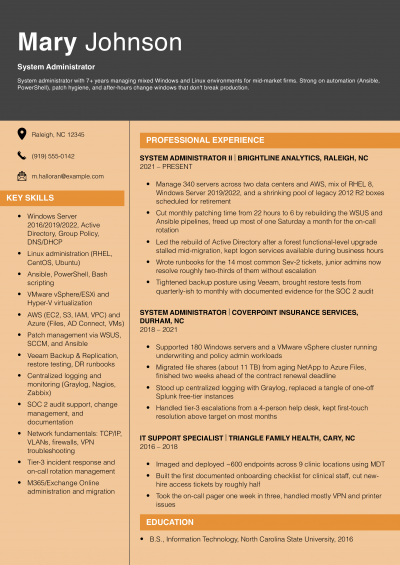
System Administrator Resume Examples and Templates for 2026
Andrew Stoner By: Andrew Stoner
Technical Writer
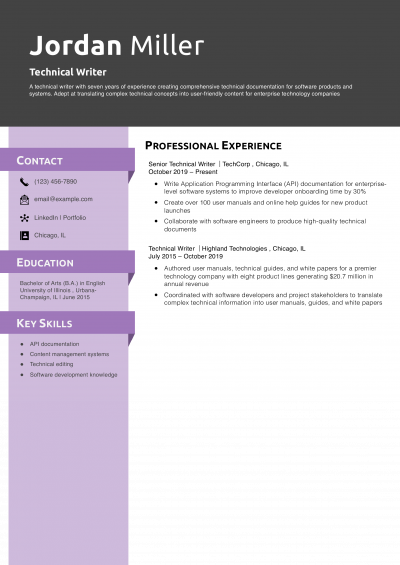
Technical Resume Examples and Templates for 2026

Andrew Stoner By: Andrew Stoner
Featured Example
User Experience Researcher Resume Examples and Templates for 2026
Andrew Stoner By: Andrew Stoner
Featured Example - Web Designer
Web Designer Resume Examples and Templates for 2026
Andrew Stoner By: Andrew Stoner
Mid-Level Game Designer Resume Example
Game Design Resume Examples and Templates for 2026
Andrew Stoner By: Andrew Stoner
Andrew Stoner
Andrew Stoner

Executive Resume Writer and Career Coach

Andrew Stoner is an executive career coach and resume writer with 17 years of experience as a hiring manager and operations leader at two Fortune 500 Financial Services companies, and as the career services director at two major university business schools.
UX Designer

Build your User Experience UX Designer resume

Customize this template in our builder in under 10 minutes.

Build my resume
Excellent Excellent
4.7 STARS on 4.7 STAR
flash image Get the 2x more job offers*
ResumeTemplates.com LOGO
Trustpilot

Elevate your career with insider job advice and expert resume templates.

Build Your Resume
  • AI Resume Builder
  • Resume Builder App
  • Action Verbs, Power Words, and Strong Synonyms to Use on Your Resume
  • How Long Should a Resume Be?
  • How To Make a Resume
  • Key Skills Examples for Your Resume
Essential Resume Guides
  • Are Resume Templates a Good Idea?
  • How to List Work Experience on a Resume
  • How To Fill Out a Resume Template
  • How To Use a Resume Template for Free
About Resume Templates
  • About Us
  • Contact Us
  • Privacy Policy
  • Terms of Service
  • Do Not Sell or Share

© 2026 Resumetemplates.com All rights reserved.