ResumeTemplates.com LOGO
  • Resume Templates
      TOP RESUME TEMPLATES
    • College
    • Combination
    • Stylish
    • Technology
    • Minimalist
    • Functional
    • Professional
    • Google Docs
    • Hybrid
    • ATS Friendly
    • Chronological
    • Microsoft Word
    • Traditional
    • Creative
    • Basic
    • General
    • Skills Based
    • Modern
    • Use our free resume templates tool
      Examples of resumes in our free resume builder tool

      When choosing a resume template, the priority should be a clean, professional look that can focus on your career accomplishments.

      Build My Resume
      View all 100+ Resume Templates
  • Resume Builder App
  • Resume Examples
      TOP RESUME EXAMPLES
    • Software Engineer
    • Registered Nurse
    • Sales
    • Customer Service Representative
    • Software Developer
    • Accountant
    • Coaching Resume
    • Product Manager
    • Teacher
    • Medical Assistant
    • Information Technology
    • Project Manager
    • Administrative Assistant
    • Bartender
    • Use our free resume templates tool
      Examples of resumes in our free resume builder tool

      When choosing a resume template, the priority should be a clean, professional look that can focus on your career accomplishments.

      Build My Resume
      View all 100+ Resume Examples
  • Resources
      Top Resources
    • Adding Your Writing Skills on a Resume
    • Bartender Job Description for a Resume
    • Best Resume File Formats
    • Effective Communication Skills for Resume With Examples, Tips, and Guide
    • Functional vs. Chronological Resume
    • Google Docs Resume Templates
    • Hobbies and Interests for Resumes
    • How Far Back Should a Resume Go?
    • How Much Does a Resume Builder Cost?
    • How To Demonstrate Organizational Skills
    • How To Edit a Resume Template in Word
    • How To Include Salary Requirements in Resumes
    • How To Insert a Picture in a Google Doc Resume Template
    • How to List Projects on a Resume
    • How To List Your Education on a Resume
    • How To Make a Resume
    • How To Make a Resume With No Job Experience
    • How to Make Your Resume Stand Out and Land Your Dream Job
    • How To Nail an Impressive Beginner Resume Summary
    • How To Present Your Accomplishments on a Resume
    • How To Say You’re a Quick Learner on Your Resume
    • How To Say You’re a Subject Matter Expert on a Resume
    • How To Upload Your Resume to Indeed
    • How To Write a Business Resume
    • How To Write a Cover Letter for a Resume
    • How To Write an Impressive Resume With Only One Job
    • How To Write a Resume Summary
    • How To Write a Student Resume
    • How To Write an Address on One Line
    • Key Skills Examples for Your Resume
    • Listing Udemy Certificates on a Resume
    • Make a Resume in Microsoft Word
    • Putting Coursera Certificates on a Resume
    • Resume Buzzwords and Cliches To Avoid
    • Resume Header Examples
    • Resume Icons, Logos, and Symbols
    • Resume Introduction And Intro Paragraph Examples
    • Resume Objective Examples
    • Resume Punctuation
    • Resume Vs. Curriculum Vitae
    • Should I Put My GPA on My Resume And How To List It
    • Summary of Qualifications for a Resume
    • The Best Color for Your Resume
    • The Complete Guide To Listing a U.S. Military Address on Your Resume
    • Types of Resume Templates
    • What Resume Template Do Employers Prefer?
    • What Template Should I Use for a Federal Resume?
    • What To Put on a Resume
    • Where To Find Free Resume Templates
    • Where To Post Your Resume for Remote Work
    • Write a Resume With No Experience
    • See all Resources
  • Research
      RESEARCH
    • 4-Day Work Week Survey
    • AI Hiring Survey
    • AI Lay Off Survey
    • AI Manager Survey
    • ChatGPT and Skill Assessments
    • ChatGPT Competence Survey
    • ChatGPT Contributes to Raises
    • Companies Increase In-Office Days
    • Companies Offer Lower Salaries YoY
    • Companies Reduce Salaries and Benefits
    • Companies Replace Workers With AI
    • Cost-of-Living Survey
    • DEI Survey
    • Employee Coffee-Badging
    • Employee Layoffs
    • Gen Z Interview Survey
    • Gen Z Worker Parents Survey
    • Hard and Soft Skills Hiring Survey
    • Hiring Managers Favor AI Skills
    • Hiring Managers Pass on Bad Resumes
    • Hiring Report
    • Listing Pronouns on Resumes
    • Lying on Resumes
    • Manager Gen Z Survey
    • Rehiring Workers Survey
    • See All Research Reports
  • Resources
      Top Resources
    • How To Fill Out A Resume Template
    • Guides and AdviceRESEARCH
    • Adding Your Writing Skills on a Resume
    • Bartender Job Description for a Resume
    • Best Resume File Formats
    • Effective Communication Skills for Resume With Examples, Tips, and Guide
    • Functional vs. Chronological Resume
    • Google Docs Resume Templates
    • Hobbies and Interests for Resumes
    • How Far Back Should a Resume Go?
    • How Much Does a Resume Builder Cost?
    • How To Demonstrate Organizational Skills
    • How To Edit a Resume Template in Word
    • How To Include Salary Requirements in Resumes
    • How To Insert a Picture in a Google Doc Resume Template
    • How to List Projects on a Resume
    • How To List Your Education on a Resume
    • How To Make a Resume
    • How To Make a Resume With No Job Experience
    • How to Make Your Resume Stand Out and Land Your Dream Job
    • How To Nail an Impressive Beginner Resume Summary
    • How To Present Your Accomplishments on a Resume
    • How To Say You’re a Quick Learner on Your Resume
    • How To Say You’re a Subject Matter Expert on a Resume
    • How To Upload Your Resume to Indeed
    • How To Write a Business Resume
    • How To Write a Cover Letter for a Resume
    • How To Write an Impressive Resume With Only One Job
    • How To Write a Resume Summary
    • How To Write a Student Resume
    • How To Write an Address on One Line
    • Key Skills Examples for Your Resume
    • Listing Udemy Certificates on a Resume
    • Make a Resume in Microsoft Word
    • Putting Coursera Certificates on a Resume
    • Resume Buzzwords and Cliches To Avoid
    • Resume Header Examples
    • Resume Icons, Logos, and Symbols
    • Resume Introduction And Intro Paragraph Examples
    • Resume Objective Examples
    • Resume Punctuation
    • Resume Vs. Curriculum Vitae
    • Should I Put My GPA on My Resume And How To List It
    • Summary of Qualifications for a Resume
    • The Best Color for Your Resume
    • The Complete Guide To Listing a U.S. Military Address on Your Resume
    • Types of Resume Templates
    • What Resume Template Do Employers Prefer?
    • What Template Should I Use for a Federal Resume?
    • What To Put on a Resume
    • Where To Find Free Resume Templates
    • Where To Post Your Resume for Remote Work
    • Write a Resume With No Experience
    • Research
    • 4-Day Work Week Survey
    • AI Hiring Survey
    • AI Lay Off Survey
    • AI Manager Survey
    • ChatGPT and Skill Assessments
    • ChatGPT Competence Survey
    • ChatGPT Contributes to Raises
    • Companies Increase In-Office Days
    • Companies Offer Lower Salaries YoY
    • Companies Reduce Salaries and Benefits
    • Companies Replace Workers With AI
    • Cost-of-Living Survey
    • DEI Survey
    • Employee Coffee-Badging
    • Employee Layoffs
    • Gen Z Interview Survey
    • Gen Z Worker Parents Survey
    • Hard and Soft Skills Hiring Survey
    • Hiring Managers Favor AI Skills
    • Hiring Managers Pass on Bad Resumes
    • Hiring Report
    • Listing Pronouns on Resumes
    • Lying on Resumes
    • Manager Gen Z Survey
    • Rehiring Workers Survey
    • Resources
    • See all Resources
  • My Account
  • Use our free resume templates tool
    Examples of resumes in our free resume builder tool

    When choosing a resume template, the priority should be a clean, professional look that can focus on your career accomplishments.

Build My Resume
Build My Resume
Home / Resume Examples / Virtual Assistant Resume Examples and Templates

4 Best Virtual Assistant Resume Examples and Templates for 2026

Andrew Stoner
By Andrew Stoner
Andrew Stoner
Executive Resume Writer and Career Coach linkedin
Andrew Stoner
, Executive Resume Writer and Career Coach
Last Updated: October 20, 2026

Every resume example is written and reviewed by our team of Certified Professional Resume Writers to ensure top-quality content and formatting.

A virtual assistant is hired on trust and proof of remote output, not on task lists. The strongest resumes show which tools you run alone, from Asana and ClickUp to Google Workspace, Slack, Calendly, and QuickBooks. Anchor your bullets in real deliverables: inbox zero for a founder, a CRM cleaned in HubSpot, or a launch calendar shipped on time.

Business owners and entrepreneurs hiring remote support scan for clear time zones, response windows, and the exact platforms you own end to end. They want to see client load, retention, and the kind of work you take off their plate.

The examples below show how to frame that proof by niche, from executive support to social media and bookkeeping assistants.

Text Version Virtual Assistant

Build your Virtual Assistant resume

Customize this template in our builder in under 10 minutes.

Build my resume
Excellent Excellent
4.7 STARS on 4.7 STAR
flash image Get the 2x more job offers*
On this page
On this page
  • Virtual Assistant Resume Examples
    • Featured Example
    • Virtual Assistant Example
    • Senior Virtual Assistant Example
    • Virtual Assistant Team Lead / Operations Manager Example
    • Text Version Virtual Assistant
  • How to Write a Virtual Assistant Resume
  • Most Popular Skills on Virtual Assistant Resumes for 2026
  • Must Have on a Virtual Assistant Resume
  • Latest BLS Statistics for Virtual Assistants
  • Frequently Asked Questions
linkedin
twitter
facebook
Tip !

A tools-and-platforms line is what gets virtual assistant resumes past the first cut business owners run; concrete task volumes and turnaround times are what make them readable enough to move to a paid trial.

Andrew Stoner , Executive Resume Writer and Career Coach

Virtual Assistant Resume Examples

Featured Example

Featured Example - Virtual Assistant
PDF
DOCX
Use This Template

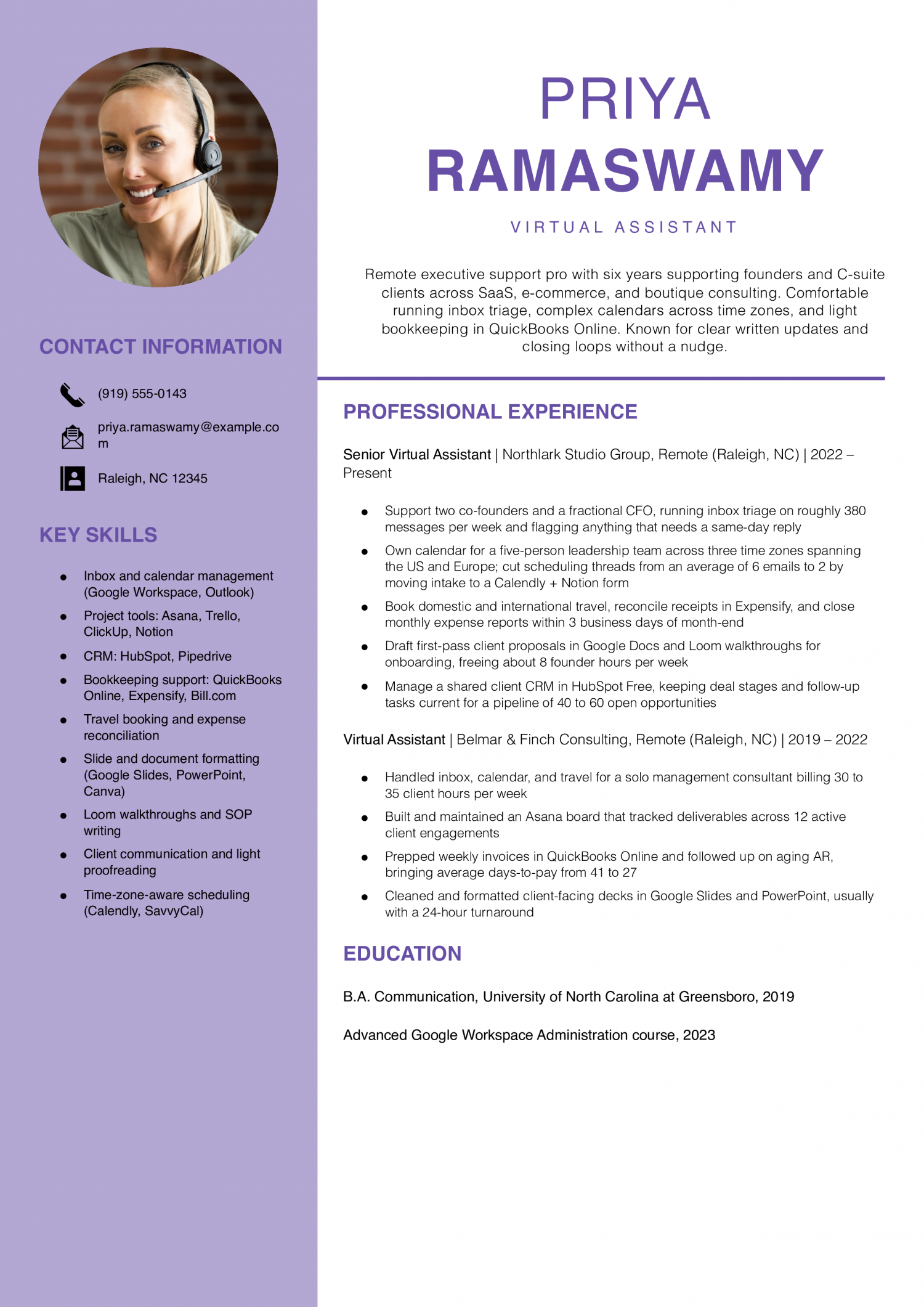
Why this resume works

  • Real workload numbers: Naming 380 emails a week and a 40 to 60 deal pipeline tells a hiring founder exactly what this VA can absorb on day one.
  • Money-adjacent tasks are shown: AR follow-up moving days-to-pay from 41 to 27 shows this VA saves the business money, not just time.
  • Tools match what small teams actually use: HubSpot Free, Asana, QuickBooks Online, and Loom are the exact stack a founder-led small business runs on.
Jump to a separate text resume example ↓

Virtual Assistant Example

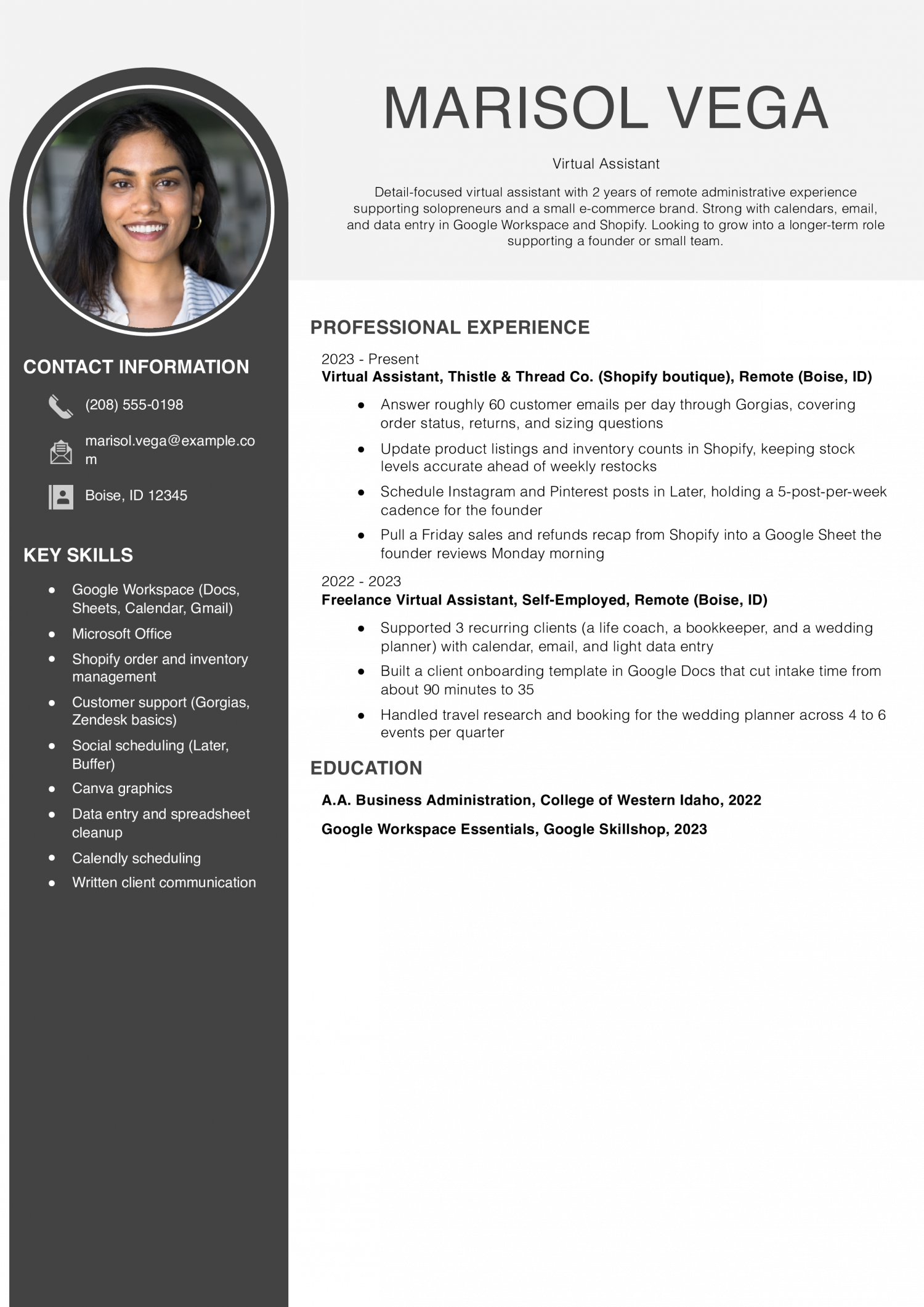
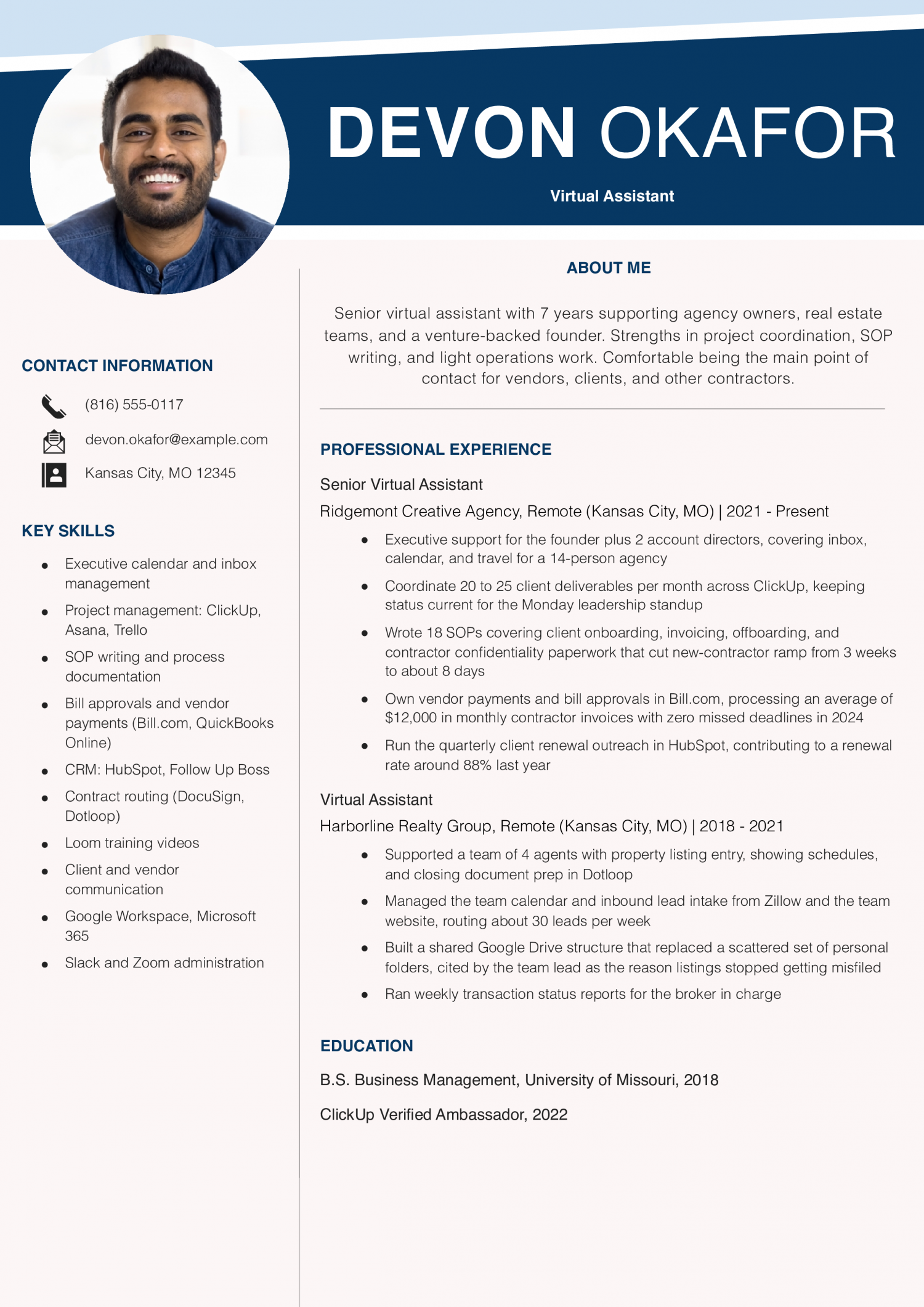
This resume is for someone new to virtual assistant work who supports one or two clients on inbox, calendar and travel. It has to prove you can run daily tasks without hand-holding.

Virtual Assistant Example
PDF
DOCX
Use This Template

Why this resume works

  • Clear daily volume: 60 customer emails a day is a concrete workload number a hiring shop can compare to their own inbox.
  • Owns a recurring deliverable: The Friday sales recap shows she can be trusted with a repeating task the founder actually reads.
  • Right tools for entry level: Shopify, Gorgias, Later, and Google Workspace are exactly the stack a small e-commerce founder is hiring for.

Senior Virtual Assistant Example

This resume is for a senior virtual assistant running a full book of clients across scheduling, billing and project work. It has to prove you own outcomes and set your own priorities.

Senior Virtual Assistant Example
PDF
DOCX
Use This Template

Why this resume works

  • Handles real money: $12,000 in monthly contractor invoices with zero missed deadlines shows this VA can be trusted with AP, not just calendars.
  • Documented process improvement: 18 SOPs and a ramp time cut from 3 weeks to 8 days is exactly the kind of change agency owners hire a senior VA to make.
  • Clear step up in scope: The jump from supporting 4 agents to supporting a 14-person agency and its founder shows real growth over the last 7 years.

Virtual Assistant Team Lead / Operations Manager Example

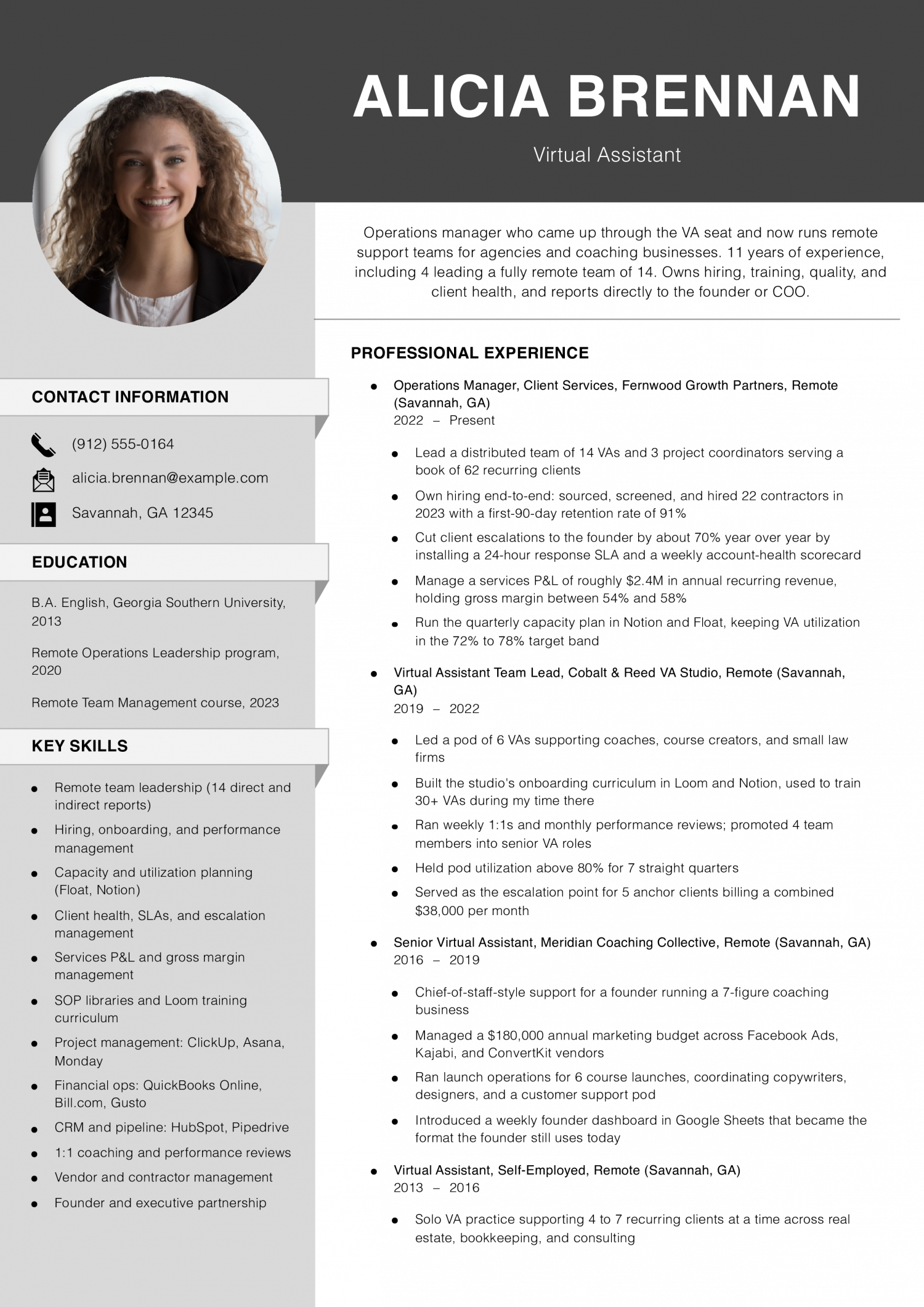
This resume is for a team lead or operations manager who hires, trains and reviews other virtual assistants. It has to prove you build process, hold quality and own client retention across the group.

Virtual Assistant Team Lead / Operations Manager Example
PDF
DOCX
Use This Template

Why this resume works

  • Runs a real P&L: $2.4M in yearly recurring revenue with 54 to 58% gross margin is operator-level language a founder or COO recognizes right away.
  • Leadership backed by numbers: 22 hires in a year with 91% 90-day retention shows this is a manager who can actually hold a team together, not just a title.
  • Full career story: The path from solo VA at $1,800 a month to operations manager over 14 people gives the reader a clear reason to trust the seniority.

Text Version Virtual Assistant

Priya Ramaswamy
Raleigh, NC | (919) 555-0143 | [email protected] | linkedin.com/in/priya-ramaswamy

PROFESSIONAL SUMMARY

Remote executive support pro with six years supporting founders and C-suite clients across SaaS, e-commerce, and boutique consulting. Comfortable running inbox triage, complex calendars across time zones, light bookkeeping in QuickBooks Online, and first-pass client-facing writing. Known for closing loops without a nudge and for writing SOPs the next person can actually follow.

EXPERIENCE

Senior Virtual Assistant
Northlark Studio Group | Remote (Raleigh, NC) | 2022-Present

  • Support two co-founders and a fractional CFO, running inbox triage on roughly 380 messages per week and flagging anything that needs a same-day reply
  • Own calendar for a five-person leadership team across three time zones spanning the US and Europe; cut scheduling threads from an average of 6 emails to 2 by moving intake to a Calendly and Notion form
  • Book domestic and international travel, reconcile receipts in Expensify, and close monthly expense reports within 3 business days of month-end
  • Draft first-pass client proposals in Google Docs and record Loom walkthroughs for onboarding, freeing about 8 founder hours per week
  • Manage a shared client CRM in HubSpot Free, keeping deal stages and follow-up tasks current for a pipeline of 40 to 60 open opportunities

Virtual Assistant
Belmar & Finch Consulting | Remote (Raleigh, NC) | 2019-2022

  • Handled inbox, calendar, and travel for a solo management consultant billing 30 to 35 client hours per week
  • Built and maintained an Asana board that tracked deliverables across 12 active client engagements
  • Prepped weekly invoices in QuickBooks Online and followed up on aging AR, bringing average days-to-pay from 41 to 27
  • Cleaned and formatted client-facing decks in Google Slides and PowerPoint, usually with a 24-hour turnaround
  • Wrote the client offboarding checklist that is still in use today

Administrative Assistant (Hybrid)
Cavendish Mortgage Advisors | Raleigh, NC | 2018-2019

  • Supported 3 loan officers with client intake, document collection, and closing prep
  • Kept the shared pipeline board current for a book of 45 to 60 loans in process
  • Answered the main line and routed roughly 40 calls per day

Front Desk Coordinator (Part-Time, During School)
Greensboro Dance Conservatory | Greensboro, NC | 2016-2018

  • Registered families for classes, processed tuition payments, and managed the studio calendar
  • Answered parent emails and rebooked makeups, typical volume of 120 emails per week

EDUCATION

  • B.A. Communication, University of North Carolina at Greensboro, 2019
  • HubSpot Inbound Certification, 2023
  • Notion Essentials Badge, 2024

SKILLS

  • Inbox and calendar management (Google Workspace, Outlook)
  • Project tools: Asana, Trello, ClickUp, Notion
  • CRM: HubSpot, Pipedrive
  • Bookkeeping support: QuickBooks Online, Expensify, Bill.com
  • Travel booking and expense reconciliation
  • Slide and document formatting (Google Slides, PowerPoint, Canva)
  • Loom walkthroughs and SOP writing
  • Client communication and light proofreading
  • Time-zone-aware scheduling (Calendly, SavvyCal)
  • Slack and Zoom administration
Use this in our builder
Copied

How to Write a Virtual Assistant Resume

01 Open with what a generic VA cannot offer

Lead with the one thing a business owner cannot find on a stock VA profile. Name a niche tool stack you run in your sleep, like ClickUp plus Dubsado for coaches. Or name a client vertical you know cold, like e-commerce shops on Shopify.

A second language, a podcast production workflow, or Kajabi course setup all work here too. Put this line right under your name, before the summary reads. Owners scanning fifty applicants are looking for a reason to stop scrolling.

Give them one concrete match to the work already sitting in their inbox. Save the general admin support language for the bullets underneath, where it belongs in context.

02 Put numbers on the work you do

Owners hiring remote support scan for scope before they read duties. A strong bullet tells them how many inboxes you clear, how many clients you juggle, or how many hours a week you save the founder. Try lines like managed inboxes for three coaches averaging 200 emails a day.

Or scheduled 40 podcast guests across two shows in six months. Or cut founder calendar admin from ten hours a week to two.

Pick two or three metrics per role that map to time saved, volume handled, or revenue touched. Round honestly. Estimates framed as approximate still beat vague verbs like assisted or supported.

03 Group your work by the service you sell

Owners buy outcomes, not a laundry list of apps. Cluster your bullets under three to five service lines you actually deliver. Common groupings include inbox and calendar management, client onboarding and CRM upkeep, and social media scheduling.

Add project coordination in Asana, Trello, or Notion if that is your lane. Bookkeeping support in QuickBooks or Xero belongs in its own cluster, since it signals a different trust level. Course launches, webinar setup, and email funnel builds sit together as launch support.

Under each cluster, write two or three bullets that show the workflow end to end. This structure lets an owner match your resume to the job on their whiteboard in under a minute. If you want to move into an in-house office role, see our office coordinator resume examples for ways to present your administrative and project coordination experience.

04 Place tools and certifications where owners see them

Business owners scan for tool fit before they read your work history. Build a page-one skills block that lists the platforms you run daily. Sort them by category: project management, CRM, email marketing, scheduling, bookkeeping, and design.

Name the actual tools, like Asana, HubSpot, ConvertKit, Calendly, QuickBooks, and Canva. Vague labels like tech savvy get skipped. If you hold a certification that matches the buyer, put it in the same block or a short credentials line beneath it.

HubSpot Academy, Google Workspace, Meta Blueprint, and Xero Advisor all read as trust signals. Owners hiring remote support cannot audit you in person, so visible proof of tool fluency early on lowers their perceived risk of a bad hire.

05 Close with education and a short client list

Keep the education section brief and near the bottom. Degree, school, and year is enough unless you finished in the last two years. If you are new to VA work, add one line naming coursework or a bootcamp tied to the service you sell.

Under education, a short client roster helps owners place you in their world. List three to five clients by industry and size, like solo business coach, seven-figure e-commerce brand, or two-person law firm. Skip client names if a past agreement bars you from sharing them.

A single testimonial line from a past client, kept under 20 words, can sit here too. This closing block turns an unknown remote hire into someone who has already done the work.

Most Popular Skills on Virtual Assistant Resumes for 2026

Five years ago, a Virtual Assistant resume read like a list of clerical duties. The mix has shifted toward software fluency and measured client outcomes. Calendar management now sits next to CRM tools and project platforms like Asana.

Business owners weigh hard skills first to confirm you can run their stack on day one. Soft skills such as discretion and written communication decide whether they trust you with inbox access. Owners hire remote support to buy back hours, so proof of self-direction matters.

Read the target job posting and mirror the exact tool names it uses. Swap generic terms for the platform the owner already runs, such as HubSpot or ClickUp. Treat the soft skills below as claims your bullets have to back with real examples.

Pair each one with a short result, like hours saved or response time cut. The two tables give you a starting vocabulary, not a finished list. Trim any skill you cannot defend in a first-round call.

Soft Skills AI-estimated %
Clear written communication 72%
Client-facing professionalism 65%
Proactive problem-solving 43%
Remote self-management 40%
Stakeholder coordination 27%

And here are the top hard skills showing up most often.

Hard Skills AI-estimated %
Calendar management 65%
Database maintenance 61%
Email correspondence 48%
Electronic filing systems 35%
Appointment scheduling 25%

Skill names and rankings come from an AI model grounded in U.S. Department of Labor occupation data for virtual assistants, not from a count of virtual assistants’ resumes built on ResumeTemplates.com.

Must Have on a Virtual Assistant Resume

Match each keyword to a task you do for paying clients.

Niche Keywords for ATS Checkers

Business owners scan a Virtual Assistant resume for proof of the exact work they need done. The words below tell you which trade terms belong on the page. Pick the row that matches your day. Executive support covers calendars, inboxes, and travel booking. Social media work covers posts, scheduling tools, and light design. E-commerce work covers listings, orders, and customer replies. Bookkeeping work covers invoices, receipts, and simple reports. Real estate support covers listings, showings, and client follow-up. Use the phrasing the trade uses, capitals and all. Drop in the two or three that match the posting. Leave off the rest so the page stays honest.

Niche Keywords ATS scans for
Executive support calendar management, inbox triage, travel booking
Social media content scheduling, Canva design, Hootsuite posting
E-commerce support Shopify listings, order fulfillment, customer service
Bookkeeping support QuickBooks entry, invoice processing, expense reconciliation
Real estate VA listing input, CRM updates, showing coordination

AI Skills to Add

Name the tool, the task and who reviews the output. Owners want to see that you draft with AI and still check the work. They also want to see that client data stays inside approved tools. Show judgment, not buzzwords, and the resume reads as honest.

What AI is actually changing for this role
Inbox triage

AI drafts replies and sorts threads, but you still approve tone, facts and any client commitments before sending.

Calendar and scheduling

Assistants propose meeting times and agendas, and you confirm priorities, travel windows and buffer blocks against the owner's real week.

Research and summaries

Chat tools pull background on leads and vendors, and you verify sources before the summary reaches the owner's desk.

Content and social drafts

AI produces first drafts of posts, captions and newsletters, and you edit for brand voice and factual accuracy.

SOPs and documentation

Models turn loose notes into checklists, and you test each step in the real tool before publishing to the team.

AI tools to name

  • ChatGPT: Draft client emails, meeting agendas and SOPs, then edit for tone and facts before sending.
  • Claude: Summarize long email threads, contracts or research docs into short briefs the owner can scan.
How to phrase AI on your resume
Do
  • Name the tool, the task and the review step
  • Say which client data stays out of public models
Skip
  • AI-powered virtual assistant
  • Leveraging AI to revolutionize admin work

Latest BLS Statistics for Virtual Assistants

About These Numbers

The Bureau of Labor Statistics does not publish a wage code for Virtual Assistant specifically. The figures below come from the closest match, Secretaries and Administrative Assistants, Except Legal, Medical, and Executive (SOC 43-6014), so treat them as a general benchmark rather than an exact number for remote assistant work.

The top-paying states for virtual assistants are not clustered in the coastal tech hubs most remote workers assume. Pay leaders show up in smaller markets where remote-work demand outstrips the local talent pool, and business owners pay a premium to keep support in a nearby time zone. The employment picture is different again, with the highest headcounts sitting in large service economies where small firms and solopreneurs cluster.

That split matters for how you frame location. If you work remotely, lead with the time zones you cover and the client regions you have served. Name the states or metros of past clients so a business owner scanning your resume can see the fit.

$47,540 National median annual
$49,350 National mean annual
$33,280 10th percentile
$66,350 90th percentile
1,706,790 Virtual Assistants in the U.S.
Where you stand

Below median

$33,280 to $47,540 Show the core stack you know, such as Google Workspace, Microsoft 365, Asana, or Trello.

Above median

$47,540 to $66,350 Name the client roster you support and the inbox or calendar volume you handle each week.

Top 10%

$66,350+ Name the operations you own end to end and the contractors you manage.

Top-paying states

# State Median Annual
1 District of Columbia $59,910
2 Massachusetts $57,940
3 Washington $57,330
4 Connecticut $57,210
5 California $55,400
6 Rhode Island $52,140
7 Oregon $51,740
8 Minnesota $51,400
9 Hawaii $50,830
10 New Jersey $50,260

Highest-employment states

# State Workers Median
1 California 158,630 $55,400
2 Texas 149,650 $45,140
3 New York 122,490 $49,600
4 Florida 104,000 $45,900
5 Illinois 74,280 $48,310
-6% projected growthJob outlook, 2025-2035

Source: U.S. Bureau of Labor Statistics, Employment Projections, 2025-2035.View on bls.gov
Source: U.S. Bureau of Labor Statistics, OEWS May 2025 release (SOC 43-6014). View on bls.gov
Written by professional resume writers and loved by hiring managers

Resume Templates offers HR approved resume templates to help you create a professional resume in minutes. Choose from several template options and even pre-populate a resume from your profile.

Build My Resume

Frequently Asked Questions

How do I write a virtual assistant resume with no prior VA experience?

Pull the admin, scheduling, and inbox work out of past jobs and reframe it as remote support. A retail lead who ran the schedule and answered vendor email has already done VA work.

Name the tools you used, list the hours you saved per week, and open with a summary that says who you help.

What should I include in a virtual assistant portfolio linked from my resume?

Include three to five short case studies showing the before state, what you built, and the time or money saved. Add sample calendars, redacted inbox rules, a standard operating procedure you wrote, and a Loom walkthrough of one workflow.

Link the portfolio in the header next to your email so an owner can open it in one click.

How do I list virtual assistant work on a resume when every client was different?

Group the clients under one heading called Virtual Assistant, then list each client as a sub-bullet with the industry, months worked, and the service you sold. A real estate broker gets inbox triage and showing coordination.

A course creator gets launch support and student email. This shows range without turning your resume into fifteen job entries.

Should contract and agency VA work go under one heading or separate ones?

Put agency work under the agency name with your title, then list the industries you supported as sub-bullets. Put direct contract work under a single Virtual Assistant heading with your city and remote noted.

Keeping the two shapes separate tells an owner whether you have handled a book of clients on your own.

How do owners weed out fake or exaggerated virtual assistant resumes?

Owners check whether the tools, the client industries, and the hours in the summary match the bullets underneath. A resume that claims Kajabi and ClickUp but names no course or project reads as padded.

Name the client type, the tool, and one number per bullet so an owner can picture the work and ask about it on a call.

Do I still call it a resume if I only work remote, or is it a CV now?

Call it a resume for US and Canadian owners, since that is the word they search on job boards and in Upwork profiles. Call it a CV for UK, Irish, and most European clients, where CV is the standard word for a one to two page work history.

The file itself looks the same. Match the word the client uses in the posting.

How should I send my resume to a US client when I work from another country?

Send a PDF named with your full name and the role, and put your time zone and working hours in the header under your email. Say plainly which hours you cover in Eastern or Pacific time so an owner does not have to do the math.

Add a short line in your summary about your overlap window and your invoicing setup.

Which resume template works best for a virtual assistant?

Try an ATS-friendly template for listing your tools and how many clients you support. You might look at a basic template.

Rate this article

Virtual Assistant Resume

Average Rating

4.8/5 stars with 238 reviews

You have given 0 Star(s)
4.8/5 stars with 238 reviews

Check Out Related Examples

Featured Example - Executive Assistant
Executive Assistant Resume Examples and Templates for 2026

Andrew Stoner By: Andrew Stoner

Lead the summary with the principal tier you support and the calendar load you carry. Name the executive title, the team size behind them, and the time zones in play. Chiefs of staff read that…
Personal assistant resume example
Personal Assistant Resume Examples and Templates for 2026
Andrew Stoner By: Andrew Stoner

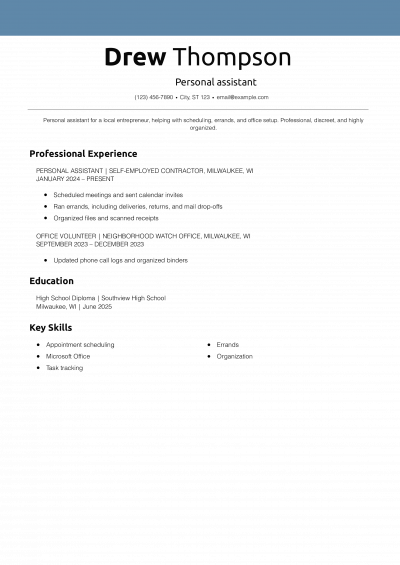
The first line of your summary should name the scope you have guarded, not your years of loyalty. Principals and executive household managers read for scale before story. Strong openers cite the number of calendars…

 Featured Example - Administrative Assistant
Administrative Assistant Resume Examples and Templates for 2026
Andrew Stoner By: Andrew Stoner

Your profile should state your years of experience and who you support. Name the level of leader (VP, C-suite, partner) and how many you back at once. Add the setting (law firm, hospital, SaaS, nonprofit)…

Veterinary Office Assistant Resume Example
Office Assistant Resume Examples and Templates for 2026
Andrew Stoner By: Andrew Stoner

Your profile should state your years of administrative experience and the office setting you have supported. Name the type of employer: a law firm, a 30-provider clinic, a construction office, a university department. Then list…

Data Entry_Experienced Example
Data Entry Resume Examples and Templates for 2026
Andrew Stoner By: Andrew Stoner

Your profile should state your years in data entry, the record type you handle (claims, invoices, orders, patient charts, inventory), and the systems you key into daily. Operations supervisors and data team leads scan the…

Andrew Stoner
Andrew Stoner

Executive Resume Writer and Career Coach

Andrew Stoner is an executive career coach and resume writer with 17 years of experience as a hiring manager and operations leader at two Fortune 500 Financial Services companies, and as the career services director at two major university business schools.

Text Version Virtual Assistant

Build your Virtual Assistant resume

Customize this template in our builder in under 10 minutes.

Build my resume
Excellent Excellent
4.7 STARS on 4.7 STAR
flash image Get the 2x more job offers*
ResumeTemplates.com LOGO
Trustpilot

Elevate your career with insider job advice and expert resume templates.

Build Your Resume
  • AI Resume Builder
  • Resume Builder App
  • Action Verbs, Power Words, and Strong Synonyms to Use on Your Resume
  • How Long Should a Resume Be?
  • How To Make a Resume
  • Key Skills Examples for Your Resume
Essential Resume Guides
  • Are Resume Templates a Good Idea?
  • How to List Work Experience on a Resume
  • How To Fill Out a Resume Template
  • How To Use a Resume Template for Free
About Resume Templates
  • About Us
  • Contact Us
  • Privacy Policy
  • Terms of Service
  • Do Not Sell or Share

© 2026 Resumetemplates.com All rights reserved.